
For over a decade, digital artists, game developers, and modders relied on Adobe Photoshop’s built-in 3D features—specifically the Filter ──> 3D ──> Generate Normal Map tool or legacy NVIDIA Normal Map plugins—to convert flat 2D textures into tangent-space normal maps. However, starting with Photoshop version 22.5 and completed in version 24, Adobe officially deprecated and removed all 3D features and 3D filter menus from Photoshop, citing architectural shifts in modern GPU driver interfaces.
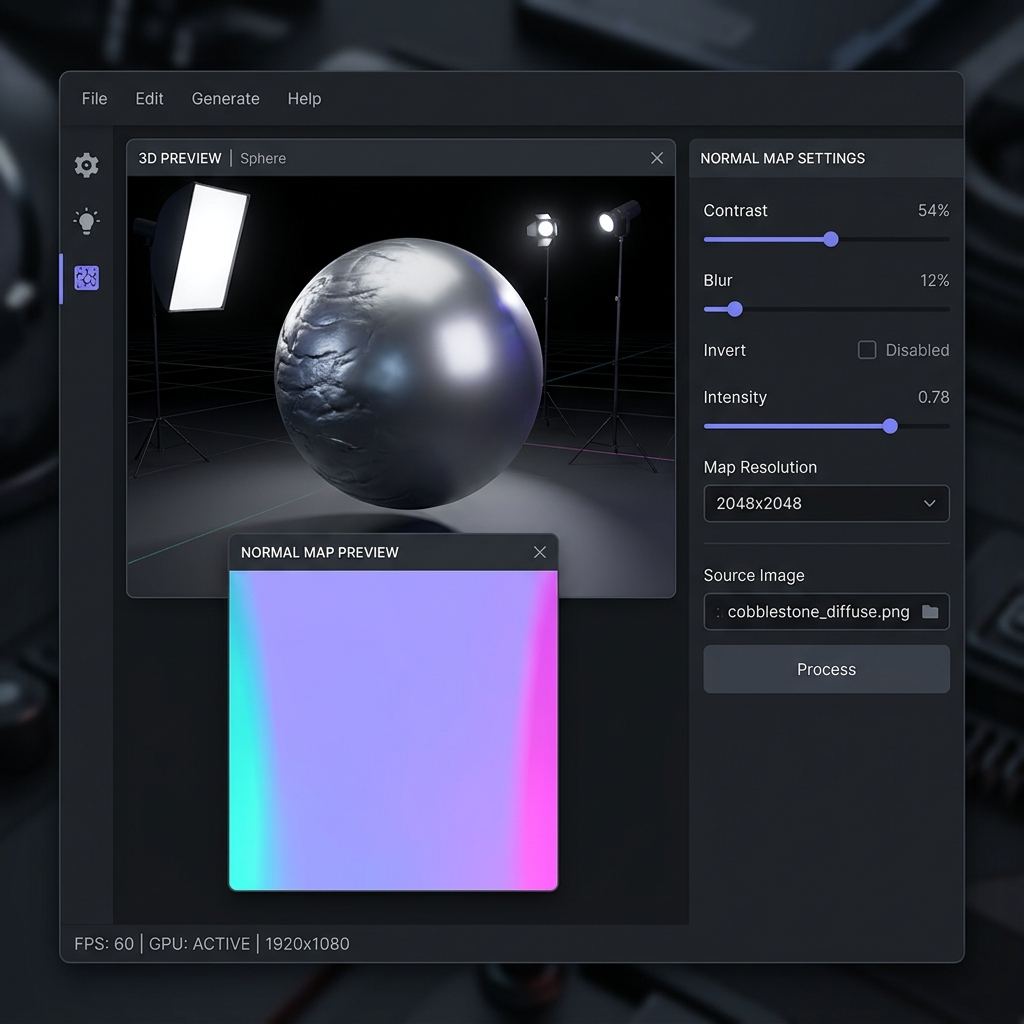
This sudden deprecation left thousands of creators searching for a fast, accessible, and reliable alternative. Opening heavy 3D digital content creation (DCC) suites like Blender or Substance Designer merely to generate a single normal map from a photo introduces massive workflow friction. Browser-based, GPU-accelerated normal map generators provide an immediate, zero-installation alternative that surpasses Photoshop’s legacy filter in both visual quality and real-time interaction.
Architectural Comparison: Legacy 2D Filters vs Modern WebGL Normal Generators
Examining how legacy Photoshop filters computed surface normals versus modern online generators reveals significant advances:
[Photoshop Legacy 3D Filter (Deprecated)]
Grayscale Conversion ──> Basic 3x3 Sobel Convolution ──> Flattens High/Low Frequencies Together ──> No Multi-Channel PBR

[Modern Online WebGL Normal Generator (NormalMap.ai)]
Direct GPU Shader ──> Decoupled High/Mid/Low Frequency Filtering ──> Real-Time 3D Mesh Preview ──> Full PBR Suite (Normal, AO, Specular, Roughness)
The deprecated Photoshop filter operated as a simple grayscale gradient edge-detector. It possessed no concept of frequency separation; adjusting the scale slider simply amplified all noise and paper grain simultaneously. Modern browser-based tools run hardware-accelerated WebGPU/WebGL fragment shaders, allowing artists to isolate subtle macro-waves from fine micro-scratches while previewing lighting changes on an interactive 3D sphere in real time.
Try generating this material directly with our AI Seamless Texture Generator.
Technical Comparison: Photoshop Legacy Filter vs Online Normal Map Generator
A direct feature comparison demonstrates why web-based tools provide a superior experience:
| Feature Dimension | Deprecated Photoshop 3D Filter | NormalMap.ai Online Generator |
|---|---|---|
| Availability & Support | Permanently removed in modern Photoshop CC | Always accessible in any modern web browser |
| Installation & Setup | Heavy 4GB+ desktop installation + Adobe Creative Cloud | Zero installation (runs instantly on desktop, Mac, Linux) |
| Real-Time 3D Viewport | Clunky software viewport prone to crashes | Hardware-accelerated 60 FPS WebGL 3D preview |
| Preview Shapes | Static cube or sphere | Sphere, Cube, Cylinder, Plane, and Custom OBJ upload |
| Multi-Frequency Detail Control | Single basic blur/contrast slider | Independent Low-Pass, Mid-Pass, and High-Pass frequency separation |
| Full PBR Texture Suite | Normal map only | Normal, Ambient Occlusion, Height, Roughness & Specular maps |
| Coordinate Swizzle | Inverting required tedious channel copying | Instant one-click Invert Green (DirectX / OpenGL) toggle |
| Cost | $20.99+/month Adobe subscription | Completely free online access |
4 Frequent Scenarios Where an Online Generator Excels
Online normal map generators provide rapid turnaround across diverse creative pipelines:
1. Converting Smartphone Textures for Game Mods
Modders for games like Skyrim, Fallout, or Assetto Corsa frequently snap real-world photos of road asphalt, tree bark, or vintage fabrics. Uploading photos directly to our image-to-normal converter generates mod-ready normal textures in seconds without touching Photoshop.
2. Architectural Visualization & Interior Design
ArchViz professionals working in SketchUp, Enscape, or Lumion need tactile relief for custom wallpaper, ceramic tiles, and woven carpets. Adjusting the high-pass radius provides delicate fabric weaves without unwanted macro-shadows.
3. Generating Matching PBR Texture Sets
Photoshop’s legacy filter only produced normal maps. In modern real-time workflows, normal maps require accompanying Ambient Occlusion and Roughness channels. Modern generators calculate synchronized multi-channel PBR texture sets from a single upload.
4. Seamless Tiling Previews
Legacy Photoshop filters could not tile textures dynamically across virtual meshes. Modern tools wrap boundary pixels seamlessly, preventing visible borders on tiled architectural walls. Learn more in our seamless texture guide.
Step-by-Step Tutorial: Generating Normal Maps in Your Browser
Follow this fast workflow to replace the deprecated Photoshop filter:
- Open the Generator: Navigate to the NormalMap.ai Web Editor in your browser.
- Drag and Drop Your Source Image: Drag any JPG, PNG, or WebP photo into the canvas. The 3D viewport instantly renders the converted normal map onto a rotating 3D preview sphere.
- Fine-Tune Frequency Details:
- Adjust the Low-Pass Filter to govern macro-surface undulations (e.g., broad stone curvature).
- Adjust the High-Pass Filter to control sharp tactile micro-details (e.g., surface pores and fine scratches).
- Choose Coordinate Orientation:
- For Unity, Blender, and WebGL, leave set to default OpenGL (Y+).
- For Unreal Engine, check Invert Green (Y-).
- Download Production Textures: Click Download Normal Map to save a crisp 24-bit PNG, or download the complete PBR bundle including matching Ambient Occlusion and Height maps.
Ready to Generate PBR Normal Maps?
Skip manual baking and transform your 2D images into tangent-space PBR textures in seconds:
- Launch with Preset Prompt: Generate Seamless Material Now
Related reading:
Frequently Asked Questions
Why did Adobe remove the 3D Normal Map filter from Photoshop?
Adobe phased out all 3D functionality in Photoshop because its underlying 3D engine was built on legacy OpenGL architectures that are incompatible with modern operating system graphics APIs like Apple Metal and Microsoft DirectX 12.
Can I still get the old NVIDIA normal map filter plugin for Photoshop?
The legacy NVIDIA DDS and Normal Map filter was a 32-bit plugin that does not function on modern 64-bit Photoshop CC installations on Windows or macOS. Browser-based WebGL tools have universally replaced these legacy plugins.
Are normal maps generated online the same quality as Photoshop’s old filter?
Online WebGL generators produce significantly higher quality normal maps. They offer decoupled multi-frequency filtering, true dynamic lighting previews, and synchronized PBR channel exports that the old Photoshop filter never possessed.
Do I need a high-end graphics card to use the online normal map tool?
No. The web application leverages standard WebGL shaders that run smoothly on modern laptop integrated graphics, mobile devices, and desktop computers.
Can I upload custom 3D models to preview my normal map on?
Yes. In the 3D preview viewport settings, you can toggle between standard primitive meshes (Sphere, Cube, Cylinder, Plane) or upload your own custom .obj 3D model to preview normal maps directly on your target asset.