
In luxury architectural visualization, high-end hospitality design, and bespoke bathroom staging, one natural stone finish is consistently specified for monolithic kitchen islands, floating vanities, and floor bookmatching: Cappuccino Marble. Prized for its warm mocha and creamy caramel undertones intersected by delicate white calcite veins, a cappuccino colour texture provides a sophisticated, organic warmth that cold grey Carrara or Statuario marble simply cannot deliver. However, rendering an authentic cappuccino stone surface in Blender, Unreal Engine 5, or V-Ray presents subtle physical challenges. When artists treat cappuccino marble like a flat photographic bitmap with uniform high-gloss roughness, the stone reads as cheap printed vinyl laminate or polished brown plastic.
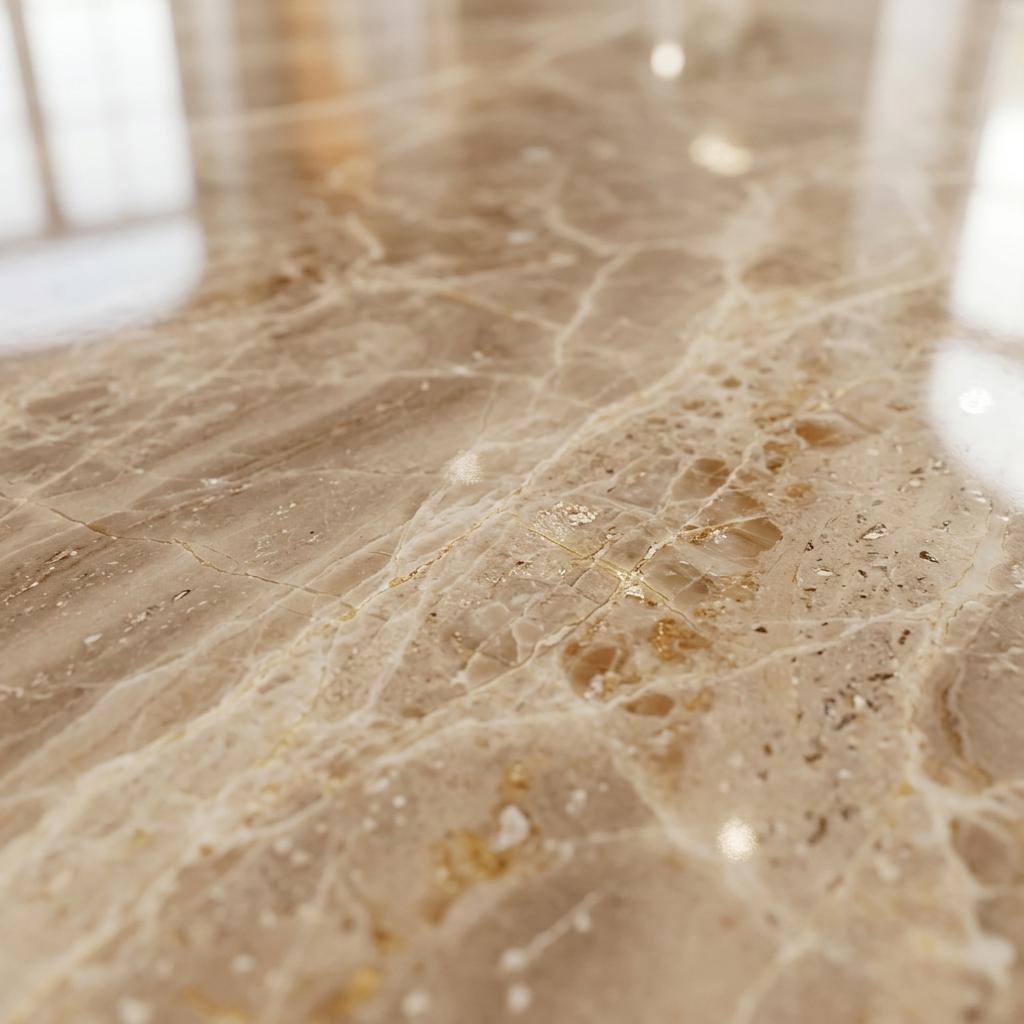
Authentic cappuccino marble combines warm mocha-beige albedo gradients with sub-millimeter calcite vein normal recesses and deep subsurface light scattering.
Real cappuccino marble (quarried primarily in Turkey and Iran) is a metamorphic rock formed from recrystallized carbonate minerals under intense subterranean heat and pressure. It is not an opaque plastic slab. Light penetrates through translucent calcite crystals, scattering within the stone matrix before exiting. Furthermore, the structural breccia seams and softer calcite veins polish at slightly different rates than the surrounding matrix, creating sub-millimeter topographical recesses. Below is the technical pipeline for capturing vein relief, configuring subsurface scattering (SSS), and authoring seamless cappuccino marble textures for high-end ArchViz.
The Petrography of Cappuccino Stone and PBR Optical Layers
To build a photorealistic shader, dissect the physical layers of polished cappuccino stone:
[Cappuccino Marble Optical Stratification]
Incident Ray ──> [Polished Resin Sealant / Clearcoat (IOR 1.52)] ──> ~4.2% Crisp Specular Reflection
                      │
                      ▼ (Transmitted Light)
                 [Recrystallized Calcite Matrix (1mm - 3mm Depth)] ──> Subsurface Color Bleed (Warm amber glow)
                      │
                      ▼
[Calcite Vein Inclusions and Breccia Fractures] ──> Opaque Breccia Core (Sharp internal boundaries)- Polished Factory Resin / Clearcoat Layer: Commercial stone slabs are polished with diamond abrasives and sealed with an ultra-thin epoxy resin. This surface acts as a smooth dielectric barrier (
IOR 1.50 - 1.53). At normal incidence, approximately 4.2% of light reflects with razor-sharp specular clarity (Roughness: 0.04 - 0.08), ramping up to 100% glancing reflection at grazing angles. - Metamorphic Subsurface Scattering (SSS): Pure marble consists of interlocking calcite grains. When light enters the stone, it scatters internally along grain boundaries. This internal diffusion softens hard shadow edges and makes slender edges (such as countertop overhangs and waterfall islands) appear warm and luminous rather than muddy grey.
- Calcite Vein Micro-Relief (Normal Map): White and golden calcite veining contains slightly softer minerals than the surrounding dense limestone matrix. High-pressure mechanical polishing causes these veins to recess by approximately
0.05mmto0.20mm. Capturing this micro-channeling in your normal map ensures that specular highlights stretch and break realistically across vein borders. - Natural Color Stratification: The warm palette ranges from pale beige cream (
#D8CAB4) to rich roasted mocha (#6E5845). Iron oxides and bituminous sediments provide the darker caramel bands, while pure crystallized calcite forms the white lightning fractures.
PBR Parameter Calibration Matrix for Cappuccino Finishes
Architectural schedules demand diverse stone surface treatments. Use this reference matrix to configure your physical shaders:
| Cappuccino Finish Variety | Base Color (RGB Hex) | Roughness Range | Clearcoat Weight | Subsurface Radius / Depth | Normal Map Profile | Micro Displacement Depth |
|---|---|---|---|---|---|---|
| Mirror-Polished Slab | #BFA890 (Warm caramel mocha) | 0.04 - 0.09 | 0.8 - 1.0 | 1.5mm (Warm amber tint) | Faint vein groove normal | 0.1mm - 0.3mm |
| Honed Matte Tile | #C7B5A0 (Muted cappuccino buff) | 0.45 - 0.65 | 0.0 | 2.5mm (Soft diffuse glow) | Broad diffuse vein gradient | 0.2mm - 0.5mm |
| Brushed Antique Travertine | #A89279 (Deep earthy taupe) | 0.55 - 0.78 | 0.0 | 1.0mm (Low transmission) | Deep pitted vug cavitation | 2.0mm - 4.5mm |
| Bookmatched Feature Wall | #C2AE96 (High-contrast mocha) | 0.05 - 0.12 | 0.7 - 0.9 | 1.8mm (Luminous vein core) | Mirrored chevron veining | 0.1mm - 0.4mm |
| Fluted 3D Architectural Rib | #B59E87 (Neutral stone tan) | 0.25 - 0.45 | 0.2 - 0.4 | 2.0mm (Crevice light bleed) | Directional fluted rib normal | 8.0mm - 15.0mm |
Note: All natural marble and travertine varieties are 100% dielectric mineral rocks. Metallic must remain strictly 0.0. Never use metallic sliders to simulate polished stone gloss.
Step-by-Step: Shading Cappuccino Marble in Blender and UE5
Follow this production workflow to construct an architectural cappuccino stone shader:
-
Extract and Isolate Vein Normal Maps: Separate the prominent calcite veins from the background stone matrix. Generate a height gradient where white veins sit slightly recessed (
Depth: 0.15mm). Convert this height field into a 16-bit tangent-space normal map. This prevents the stone surface from reading as a flat printed decal when raking sunlight glances across a kitchen island. -
Configure Subsurface Scattering (Blender Cycles): In Blender 4.x Principled BSDF:
- Set Subsurface Weight to
0.15 - 0.25. - Set Subsurface Radius to
RGB (1.0, 0.65, 0.40)to simulate the warmer absorption of reddish-gold light inside the stone. - Set Subsurface Scale to
0.002m(2mm). This prevents the marble from looking like waxy translucent soap while eliminating dark, muddy shadows in thin countertop bevels.
- Set Subsurface Weight to
-
Layer the Polished Finish with Clearcoat: Rather than dropping primary Roughness to near zero, use a dual-layer approach:
- Set base material Roughness to
0.18 - 0.28(representing raw polished mineral grain). - Set Coat Weight to
0.85with Coat Roughness at0.03 - 0.06and Coat IOR at1.52. - This creates a realistic physical separation between the glassy factory sealant and the underlying stone grain.
- Set base material Roughness to
[Blender 4.x Cappuccino Marble PBR Architecture]
(Albedo Texture: #BFA890 composite) ───> [Principled BSDF: Base Color]
(Subsurface Color: Warm amber tint) ───> [Principled BSDF: Subsurface Color]
(Subsurface Weight: 0.20, Scale: 2mm) ─> [Principled BSDF: Subsurface]
(Base Roughness: 0.22) ────────────────> [Principled BSDF: Roughness]
(Coat Weight: 0.85, Roughness: 0.04) ──> [Principled BSDF: Coat Weight / Roughness]
(Calcite Vein Normal Map) ─────────────> [Principled BSDF: Normal]
(Bevel Node: 1.5mm Radius) ────────────> [Principled BSDF: Coat Normal]-
Model Bookmatching and Waterfall Edges: For large architectural installations, align UV seams to simulate bookmatched slabs (mirroring UVs across the centerline seam) and waterfall miter joints. Ensure vein flow continues continuously around 90-degree countertop edges without sudden directional breaks.
-
Incorporate Micro-Scratches on High-Wear Surfaces: For kitchen countertops and hotel reception desks, blend a subtle surface imperfection overlay into the Clearcoat Roughness channel. Clamping fine cleaning swirls between
0.04and0.12creates natural micro-wear visible only when reflected lights catch the surface at grazing angles.
Creating Custom Cappuccino Marble Textures and Normal Maps
Sourcing authentic, high-resolution seamless cappuccino marble textures with matching vein normal maps, subsurface depth masks, and tileable bookmatched pairs from generic image libraries is notoriously difficult. Photographed slabs almost always contain harsh flash reflections, perspective distortion, or abrupt edge seams.
If you need to generate production-ready cappuccino marble normal maps, calcite veining displacement fields, and luxury architectural PBR texture sets, power up your ArchViz workflow with our Free Online Normal Map and PBR Generator — Try Cappuccino Marble. You can also generate seamless tileable stone flooring and wall cladding surfaces using our Seamless Texture Generator Online.
Cappuccino Marble Production Checklist
-
Metalliclocked strictly to0.0; natural marble is an absolute dielectric insulator. - Subsurface Scattering (SSS) calibrated with warm amber radius (
Scale: 1.5mm - 2.5mm) to prevent waxy soap artifacts. - Calcite veins recessed in the normal map (
0.05mm - 0.20mm) to catch realistic grazing light interruptions. - Factory resin polish simulated via Clearcoat layer (
Weight: 0.8 - 1.0,Roughness: 0.03 - 0.06). - Bookmatching and waterfall miter seams aligned across architectural geometry UVs.
- Base Color saturation kept in natural beige-mocha tones (
#BFA890to#6E5845), avoiding muddy green or yellow shifts.
Related reading: Marble Texture Seamless · Seamless Terrazzo Texture · Rock Texture PBR Guide · Glossy Beige Laminate Texture Guide