
Physically Based Rendering (PBR) revolutionized digital computer graphics by standardizing how light interacts with matter based on real-world physics. Rather than hand-painting highlights and fake ambient shadows onto a single diffuse texture, PBR workflows require multi-channel material packages: Albedo (Base Color), Tangent-Space Normal, Roughness, Metallic, and Ambient Occlusion. Traditionally, authoring these multi-map sets demanded specialized node engineering in Substance Designer or costly photogrammetry cross-polarization scanning. Today, ai generated pbr textures have emerged as a disruptive technological pipeline, enabling technical artists to produce complete, physically plausible 4K material sets in seconds from natural language descriptions.
However, utilizing AI for 3D PBR materials differs fundamentally from 2D concept art generation. A regular image generator produces pretty pictures with hardcoded shadows and lighting angles that break real-time 3D rendering. True AI PBR generation requires synchronized channel synthesis, neutral delighting, and cyclic boundary wrapping. Below is the technical guide to harnessing neural PBR materials in game engines and DCC suites.
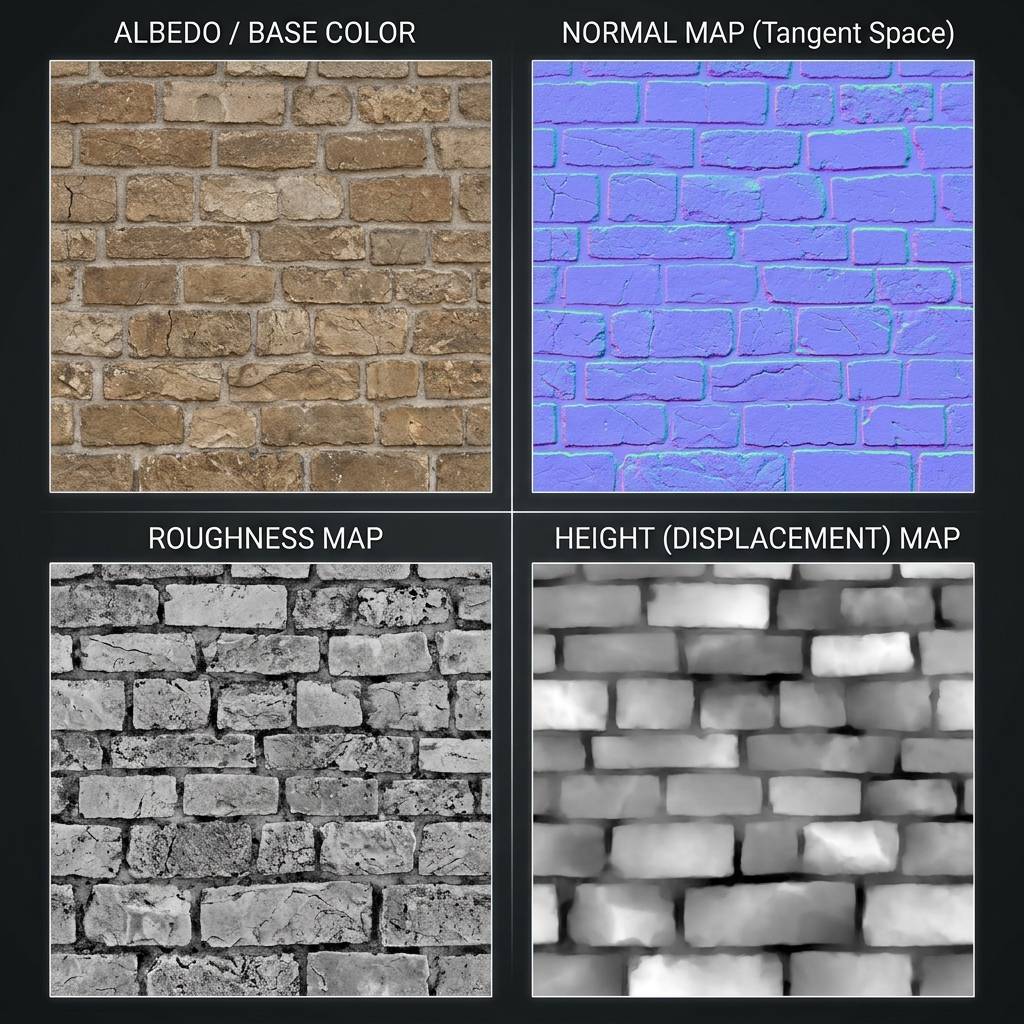
Four-channel AI PBR texture package showing aligned Albedo, Tangent Normal, Roughness, and Displacement maps.
Anatomy of an AI-Generated PBR Texture Bundle
A production-ready AI PBR texture output contains mathematically decoupled image channels, each governing a specific optical property in your shader graph:
[Synchronized Neural PBR Output Architecture]
                         ┌──> Albedo Map    (sRGB, Delit, Pure Reflectance)
                         ├──> Normal Map    (Linear, Tangent-Space [-1, 1] Vectors)
User Prompt ──> AI Engine ├──> Roughness Map (Linear, Microfacet Scatter [0.0 - 1.0])
                         ├──> Height Map    (16-bit, Geometric Displacement)
└──> Metallic Map (Linear, Binary Conductor / Dielectric)- Delit Albedo (Base Color): Must contain zero directional shadows, zero ambient occlusion crevices, and zero specular highlights. The AI extracts pure surface albedo, allowing real-time game engine lights (like Unreal Engine Lumen) to illuminate the surface accurately from any angle.
- Tangent-Space Normal Map: Encodes micro-surface angles in RGB channels (Red = X tangent, Green = Y bitangent, Blue = Z normal). Neural models compute true geometric curvature rather than relying on noisy grayscale luminance.
- Calibrated Roughness Map: Controls specular highlight spread. Smooth materials (polished marble, wet asphalt) output dark pixels (
0.05to0.2), while diffuse materials (dry sandstone, unvarnished wood) output bright pixels (0.75to0.95). - 16-Bit Displacement / Height Map: Supplies vertex displacement and Parallax Occlusion Mapping (POM) for deep structural depth that changes silhouette profiles under grazing angles.
Comparison: Procedural Node Graph vs. AI PBR Generation
| Metric / Attribute | Procedural Nodes (Substance Designer) | AI Generated PBR Textures (Our Tool) | Photogrammetry Scanning |
|---|---|---|---|
| Creation Speed | 3 to 12 hours per material | Under 15 seconds | 1 to 3 days (capture + bake) |
| Tiling Seam Quality | 100% mathematically seamless | 100% automated cyclic boundary wrap | Requires manual clone stamping |
| Material Variation | Sliders allow parametric tweaks | Text prompt variations in seconds | Requires scanning a new object |
| Hardware Overhead | High local workstation load | Zero (Cloud GPU accelerated) | DSLR, cross-polarized ring flash |
| Skill Curve | Steep mathematical node mastery | Zero (Natural language prompt) | Photogrammetry alignment skills |
Writing High-Precision Prompts for AI PBR Materials
To generate pristine, physically accurate materials, structure your text prompts using the Three-Tier PBR Specification:
- Tier 1 (Base Material & Condition):
aged chiseled castle masonry, weathered porous limestone blocks - Tier 2 (Surface Wear & Micro-Details):
crumbled lime mortar joints, fine surface pitting, faint water staining - Tier 3 (PBR Technical Requirements):
flat diffuse lighting, no shadows, seamless tileable 4K, PBR ready
Prompt Examples for Production Assets
❌ AVOID: "A dark scary dungeon wall with torches glowing on it dramatic shadows 8K"
-> Generates baked torchlight and deep black shadows that ruin real-time engine lighting.

✅ PREFERRED: "Medieval dungeon stone block wall, damp rough granite with chiseled edges and dark recessed mortar, flat diffuse overhead lighting, no cast shadows, seamless tileable 4K, PBR normal map ready"
-> Generates a clean, flat-lit albedo with synchronized normal and roughness maps ready for real-time shaders.
Generate Normal Maps and Custom Materials Online
Accelerate your 3D production pipeline by generating custom materials on demand.
If you need to generate production-ready normal maps and PBR textures for this workflow, start with our Free Online Normal Map Generator — Try Aged Chiseled Castle Masonry.
You can also generate tileable surface textures for modular environment meshes using our Seamless Texture Generator — Try Castle Stone Wall Texture.
Integrating AI PBR Textures into Blender and Unreal Engine 5
Follow these engine settings to prevent common color space rendering errors:
- Albedo Map: Color space must be configured to sRGB.
- Normal, Roughness, Metallic, Height Maps: Color space MUST be set to Linear / Non-Color. Leaving Roughness in sRGB distorts gamma values by
2.2, making dry surfaces look hyper-glossy and wet. - ORM Texture Packing: For optimal memory bandwidth in Unreal Engine or Unity, pack Ambient Occlusion into the Red channel, Roughness into Green, and Metallic into Blue.
Related Guides and Reading
- AI Texture Generator Guide: PBR Maps, Prompts, and 3D Workflows — In-depth overview of diffusion-based texture synthesis.
- Normal Map vs. Base Color in PBR Materials — Avoiding lighting bleed and shader conflicts.
- How to Preview PBR Materials Online in 3D — WebGL inspect tools for quick material verification.
- What is a Tileable Texture: 3D Artists Guide — Seamless boundary techniques for modular architecture.