
Open an uncompressed normal map in an image viewer or examine a shader graph in Blender or Unreal Engine, and you will encounter numbers that seem contradictory. A 3D artist inspecting an RGB color picker sees integers between 0 and 255 (or normalized floating-point numbers between 0.0 and 1.0). Yet, inside the GPU vertex and pixel shader pipelines, those exact same pixels operate as unit directional vectors spanning from -1.0 to +1.0.
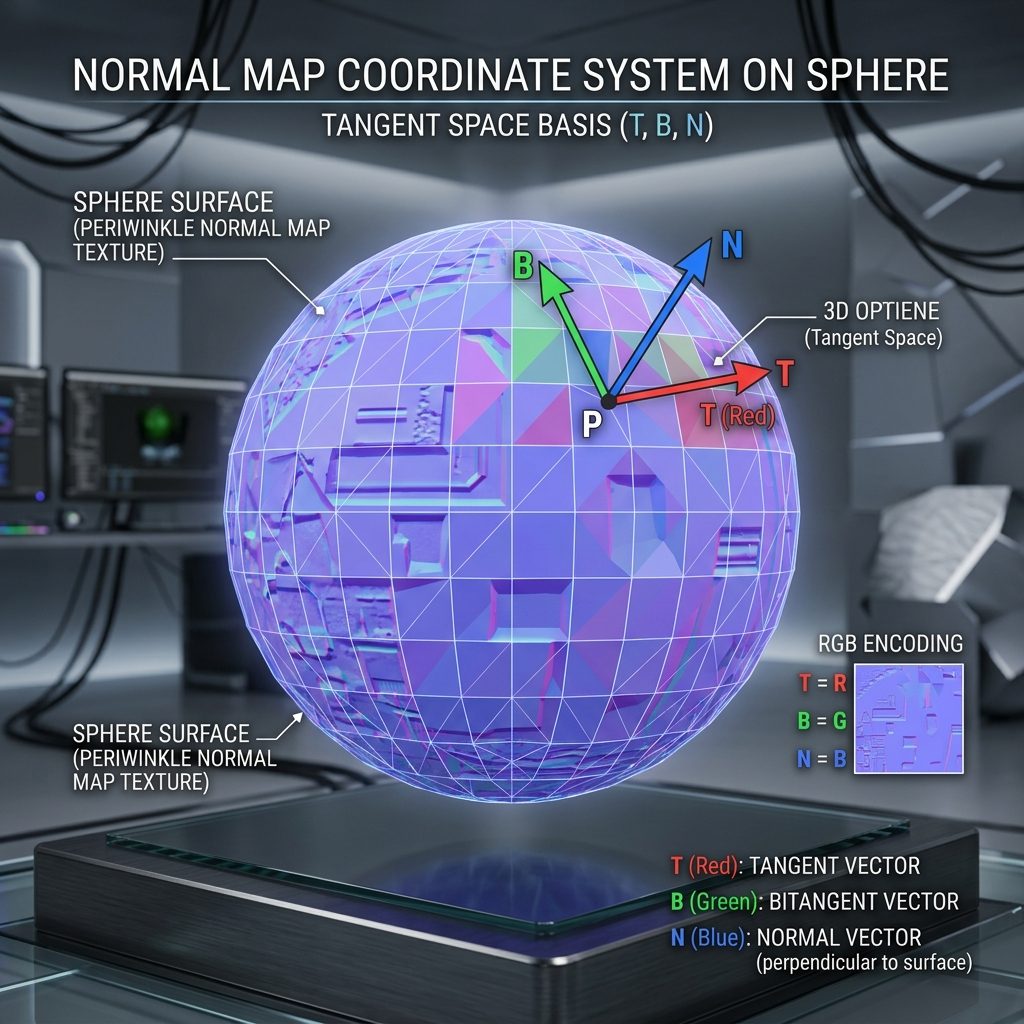
Normal map values represent continuous geometric vectors in tangent space, where RGB channels map mathematically to X, Y, and Z surface coordinates.
Understanding how these numerical systems correlate is essential for troubleshooting broken lighting seams, preventing harsh specular clipping, and blending multi-frequency surface relief without destroying physical accuracy. Here is the technical breakdown of how normal map values work across storage formats, GPU decoding registers, and real-time engine shaders.
The Dual Coordinate Systems: Vectors vs. Color Bytes
A normal vector is a mathematical direction perpendicular to a polygonal surface. Because lighting calculations rely on the dot product between incoming light rays and surface normals, vectors must be able to tilt leftward, rightward, upward, and downward relative to the polygon surface:
- Left / Right (Tangent X axis): Ranges from
-1.0(pointing fully left) to+1.0(pointing fully right). - Down / Up (Bitangent Y axis): Ranges from
-1.0(pointing fully down) to+1.0(pointing fully up). - Inward / Outward (Normal Z axis): Ranges from
0.0(tangent to surface) to+1.0(pointing straight out toward the viewer).
Because standard digital images (JPEG, PNG, TGA) cannot store negative numbers in their raw byte arrays, graphic APIs use an affine transformation to remap the negative [-1.0, +1.0] vector interval into the positive [0, 255] byte interval.
[Vector to Color Encoding (Offline Baking)]
Vector Space: [-1.0, +1.0] ──[+ 1.0]──> [0.0, 2.0] ──[/ 2.0]──> [0.0, 1.0] ──[* 255.0]──> Color Byte [0, 255]

[Color to Vector Decoding (Real-Time GPU Shader)]
Color Byte: [0, 255] ──[/ 255.0]──> [0.0, 1.0] ──[* 2.0]──> [0.0, 2.0] ──[- 1.0]──> Tangent Vector [-1.0, +1.0]
When a polygon has zero microscopic slope and lies completely flat against its tangent frame, the vector value is strictly (0.0, 0.0, 1.0). Run through the encoding formula:
- X (Red):
(0.0 + 1.0) * 0.5 * 255 = 127.5 ≈ 128(Hex#80) - Y (Green):
(0.0 + 1.0) * 0.5 * 255 = 127.5 ≈ 128(Hex#80) - Z (Blue):
(1.0 + 1.0) * 0.5 * 255 = 255.0 = 255(Hex#FF)
This calculation produces the iconic #8080FF periwinkle purple baseline present across all standard tangent space normal textures.
Normal Map Values and Directional Reference Table
The table below correlates raw vector directions with their corresponding normalized float values, 8-bit RGB byte representations, and visual slope behaviors on a 3D mesh:
| Surface Slope / Feature | Tangent Vector (X, Y, Z) | Normalized Float [0.0, 1.0] | 8-Bit RGB Byte [0, 255] | Dominant Visual Hue |
|---|---|---|---|---|
| Completely Flat (Perpendicular) | (0.00, 0.00, +1.00) | (0.50, 0.50, 1.00) | RGB(128, 128, 255) | Periwinkle Purple (#8080FF) |
| Max Left Tilt (-X) | (-1.00, 0.00, 0.00) | (0.00, 0.50, 0.50) | RGB(0, 128, 128) | Dark Cyan (#008080) |
| Max Right Tilt (+X) | (+1.00, 0.00, 0.00) | (1.00, 0.50, 0.50) | RGB(255, 128, 128) | Bright Coral Red (#FF8080) |
| Max Downward Tilt (-Y) | (0.00, -1.00, 0.00) | (0.50, 0.00, 0.50) | RGB(128, 0, 128) | Deep Magenta (#800080) |
| Max Upward Tilt (+Y) | (0.00, +1.00, 0.00) | (0.50, 1.00, 0.50) | RGB(128, 255, 128) | Bright Chartreuse (#80FF80) |
Notice that in realistic surface normal maps, individual vectors rarely reach extreme -1.0 or +1.0 slopes on X and Y, because the Pythagorean identity requires the vector length to equal exactly one:
$$\sqrt{X^2 + Y^2 + Z^2} = 1.0$$
If X or Y tilted to 1.0, Z would drop to 0.0, representing a surface facet angled 90 degrees perpendicular to the viewer, which produces heavy grazing dark edges.
How Normal Map Strength Scales Vector Values in Shaders
In 3D tools like Blender, Unity Shader Graph, or Unreal Engine Material Editor, artists routinely adjust a Normal Strength slider. A common misconception is that boosting strength simply brightens the texture channels. In reality, multiplying RGB values directly destroys the vector normalization and causes rendering artifacts.
Here is how modern game engines scale normal values under the hood:
[Engine Shader Normal Scaling Implementation]
Unpacked Vector: N = Texture.rgb * 2.0 - 1.0;
Scaled Vector:   N_scaled = float3(N.xy * Strength, N.z);
Normalized: N_final = normalize(N_scaled);- Strength = 1.0 (Default): Preserves the baked surface curvature untouched.
- Strength < 1.0 (Flattening): Multiplies X and Y toward
0.0. When normalized, the Z component dominates, shifting the vector closer to(0, 0, 1)and smoothing out micro-relief. - Strength > 1.0 (Exaggerating): Multiplies X and Y slopes outward. While this steepens crevices, values exceeding
2.5push vectors past grazing thresholds, resulting in black rim fringes and noisy specular shimmer.
8-Bit Banding vs. 16-Bit Half-Float Precision
When working on wide, subtle surfaces (such as curved automotive body panels, smooth plastic casings, or calm water planes), 8-bit normal map values show noticeable stepped quantization rings:
- In 8-bit storage, only
128discrete positive values exist between zero slope and maximum tilt. - This creates stepping increments of approximately
0.0078per vector step, causing visible faceted banding in high-contrast specular reflections. - For hero assets or smooth curved geometry, export normal maps in 16-bit PNG, TIFF, or EXR format. 16-bit storage provides
65,536increments per channel, guaranteeing buttery-smooth vector gradations.
Reconstructing Z Values in Modern BC5 Compression
If you inspect runtime texture memories in Unreal Engine 5 or modern AAA engines, you will notice that tangent space normal maps are rarely stored with three RGB channels. Instead, they use BC5 (ATI2 / 3Dc) texture compression.
Because unit vectors satisfy $X^2 + Y^2 + Z^2 = 1$, the blue channel (Z component) is completely redundant when $Z \ge 0$. Game engines discard the blue channel on disk to save 33% to 50% video memory, storing only Red (X) and Green (Y) in high-precision two-channel compression blocks:
// GPU Pixel Shader Reconstructing Z from BC5 Normal
float2 xy = tex2D(NormalSampler, uv).rg * 2.0 - 1.0;
float z = sqrt(saturate(1.0 - dot(xy, xy)));
float3 normalVector = float3(xy, z);
This decompression happens on dedicated GPU texture hardware at zero performance cost while eliminating cross-channel compression artifacts.
Generating Calibrated Normal Maps for Production
Creating clean normal maps with mathematically accurate vector ranges no longer requires complex manual channel math in Photoshop. Dedicated procedural generators ensure every pixel falls within valid unit hemisphere boundaries while maintaining seamless tiling.
If you need to generate production-calibrated normal maps and complete PBR texture sets with accurate vector depth, streamline your material pipeline with our Free Online Normal Map and PBR Generator — Try Brushed Titanium. You can also generate seamless mechanical and surface textures for 3D environments using our Seamless Texture Generator Online.
Normal Map Values Technical Checklist
- Unpack formula
Color * 2.0 - 1.0verified in custom shader nodes. - Base surface areas calibrated to
#8080FF(RGB 128, 128, 255). - Normal strength slider kept within
0.5 - 2.0to avoid vector clipping. - High-gloss curved surfaces saved in 16-bit precision to eliminate banding rings.
- Compression format set to BC5 / Normalmap in game engine import settings.
Related reading: Flat Normal Map Color Explained · What is a Normal Map? · Roughness Map Guide · Normal Map vs Base Color Differences