
Open any game asset folder or PBR material library, and you will inevitably encounter textures filled with a distinctive periwinkle, lavender-blue shade. Even when an object has virtually no micro-surface relief—such as a polished glass pane, clean acrylic panel, or smooth sheet metal—its normal map is never blank white or transparent. Instead, it is uniformly filled with the exact hex code #8080FF.
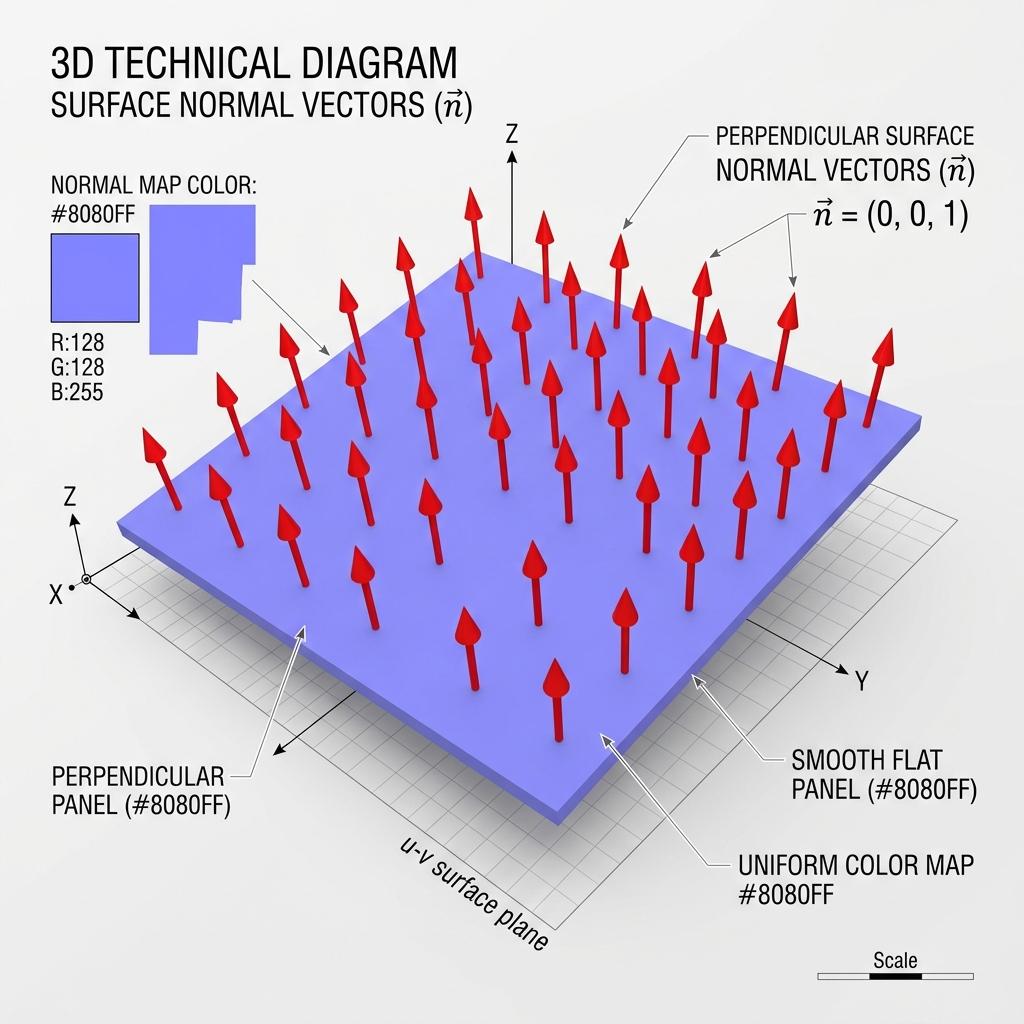
A flat normal map is uniformly tinted #8080FF because RGB (128, 128, 255) mathematically maps to the perpendicular tangent unit vector (0, 0, 1).
Why does a neutral, flat surface translate to a light purple color rather than pure grey or black? The answer lies in how modern graphics hardware bridges 8-bit image compression with 3D coordinate vector mathematics. Below is the technical breakdown of the flat normal map color, the vector math behind #8080FF, and how technical artists use neutral normal maps to fix shading bugs and blend complex materials.
The Vector Math Behind the Lavender Hex Code
Graphics processing units (GPUs) calculate surface lighting by computing the dot product between the light direction and the surface normal vector. In mathematics, a unit normal vector perpendicular to a flat 2D plane points straight out along the positive Z-axis:
$$\vec{n} = (X: 0.0, Y: 0.0, Z: 1.0)$$
However, standard image formats like PNG, TGA, and JPEG store color values as unsigned 8-bit integers ranging from 0 to 255 (or normalized floating-point colors from 0.0 to 1.0). Because vectors require negative coordinates to represent surfaces angling backward or leftward (from -1.0 to +1.0), graphics engineers designed an unpacking formula:
$$\text{Vector} = (\text{Color} \times 2.0) - 1.0$$
[Color to Vector Decoding Formula]
Color Byte (0 to 255) ──[/ 255.0]──> Normalized (0.0 to 1.0) ──[* 2.0 - 1.0]──> Unit Vector (-1.0 to +1.0)

For Flat Normal Color #8080FF:
  Red   Channel (Hex 80 = 128): (128 / 255.0 * 2.0) - 1.0 ≈  0.0  ──> X Axis (Tangent / Right)
  Green Channel (Hex 80 = 128): (128 / 255.0 * 2.0) - 1.0 ≈  0.0  ──> Y Axis (Bitangent / Up)
  Blue  Channel (Hex FF = 255): (255 / 255.0 * 2.0) - 1.0 =  +1.0 ──> Z Axis (Normal / Outward)
Because the Z-axis (pointing perpendicular to the polygon) receives full intensity while the X and Y axes remain completely centered at the zero midpoint, the resulting RGB mix creates that ubiquitous periwinkle lavender hue:
- Red (X Tangent):
128(Midpoint =0.0slope) - Green (Y Bitangent):
128(Midpoint =0.0slope) - Blue (Z Normal):
255(Maximum =+1.0outward direction) - Hex Code:
#8080FF
The 8-Bit Precision Trap: 127 vs. 128
If you divide an 8-bit byte (256 possible values from 0 to 255) directly in half, true zero mathematically falls on 127.5. Because digital images cannot store fractional pixel integers, artists frequently debate whether #7F7FFF (RGB 127, 127, 255) or #8080FF (RGB 128, 128, 255) represents the true flat normal map color.
In practice:
- Hardware Unpacking: Modern game engines (Unreal Engine 5, Unity HDRP, and Godot) and graphic APIs (DirectX and Vulkan) standardize on
128as the neutral midpoint. Unpacking128yields+0.00392, which normalizes back to(0, 0, 1)during GPU vector normalization passes. - 16-Bit Normal Maps: In high-end film pipelines using 16-bit half-float formats (
.exr), the exact zero midpoint is preserved without truncation artifacts, eliminating subtle stepping rings across wide, flat surfaces.
Color and Vector Conversion Reference Matrix
| Tangent Vector Coordinate | Normalized Float [0, 1] | 8-Bit RGB Value [0, 255] | Hex Code | Visual Surface Orientation |
|---|---|---|---|---|
(0.0, 0.0, 1.0) | (0.5, 0.5, 1.0) | RGB(128, 128, 255) | #8080FF | Neutral Flat Plane (Perpendicular) |
(-1.0, 0.0, 0.0) | (0.0, 0.5, 0.5) | RGB(0, 128, 128) | #008080 | Extreme Left Tilt (-X) |
(+1.0, 0.0, 0.0) | (1.0, 0.5, 0.5) | RGB(255, 128, 128) | #FF8080 | Extreme Right Tilt (+X) |
(0.0, -1.0, 0.0) | (0.5, 0.0, 0.5) | RGB(128, 0, 128) | #800080 | Downward Tilt (-Y OpenGL) |
(0.0, +1.0, 0.0) | (0.5, 1.0, 0.5) | RGB(128, 255, 128) | #80FF80 | Upward Tilt (+Y OpenGL) |
When Technical Artists Use Flat Normal Maps
A flat normal map is far more than a placeholder texture. In production studio pipelines, neutral #8080FF maps serve three critical functional roles:
1. Inpainting and Erasing Baking Artifacts
When baking high-poly meshes down to low-poly models, ray projection errors frequently produce dark streaks, pinched seams, or skewed bevels across flat areas. In Photoshop or Substance Painter, painting directly over the glitch with a solid brush set to #8080FF restores the polygon to its raw geometric contour without requiring a complete re-bake.
2. Masking Multi-Layer Materials
In complex shader setups—such as combining a rusted iron base material with a smooth automotive paint coat—shader graphs use grayscale opacity masks to switch between material layers. Wiring a neutral flat normal #8080FF node into the clearcoat layer suppresses micro-surface roughness, ensuring the lacquer coat remains glass-smooth while the underlayer displays heavy normal distress.
3. Neutral Texture Slot Fallbacks in Game Engines
If a custom material shader requires a normal map input socket to compile its lighting instructions, passing an empty black texture (#000000) forces the GPU to calculate surface normals pointing backwards (-1.0, -1.0, -1.0), resulting in solid black shadows. Supplying a 1x1 pixel #8080FF PNG satisfies the shader compiler while instructing the GPU to leave lighting calculations completely neutral.
Generating Clean Normal Maps Without Color Skew
When creating normal maps from photographs or hand-drawn sketches, improper height processing frequently shifts the average color away from #8080FF, skewing the entire mesh’s lighting toward one side. High-precision normal map generators ensure that flat plateaus and undisturbed background regions remain locked at pure RGB (128, 128, 255).
If you need to generate production-ready PBR textures with perfectly balanced neutral tangent vectors, power up your asset workflow with our Free Online Normal Map and PBR Generator — Try Brushed Metal Panel. You can also generate seamless architectural backdrops with flawless flat specular reflections using our Seamless Texture Generator Online.
Neutral Normal Map Validation Checklist
- Flat background regions strictly match hex
#8080FF(RGB128, 128, 255). - Image imported as Linear / Non-Color (never apply sRGB gamma curves).
- 1x1 neutral fallback textures generated with
#8080FFrather than black or white. - Texture compression settings set to
BC5/Normalmapto eliminate blue-channel banding. - No gradient drift or directional lighting baked into flat planar surfaces.
Related reading: What is a Normal Map? · How to Set Up a Normal Map in Blender · Convert Albedo Diffuse to Normal Map · Roughness Map Guide