
For over a decade, Christian Petry’s open-source web application at cpetry.github.io/NormalMap-Online has served as an accessible, browser-based utility for indie game developers, 3D modders, and digital artists. By processing heightmaps directly inside the browser using client-side JavaScript and WebGL shaders, it removed the need for heavy desktop software when generating quick bump maps.
As real-time rendering pipelines evolved toward Physically Based Rendering (PBR) standards in Unreal Engine 5, Unity HDRP, and Blender Cycles, texture workflows shifted from simple 2D gradient filters to multi-channel material generation.
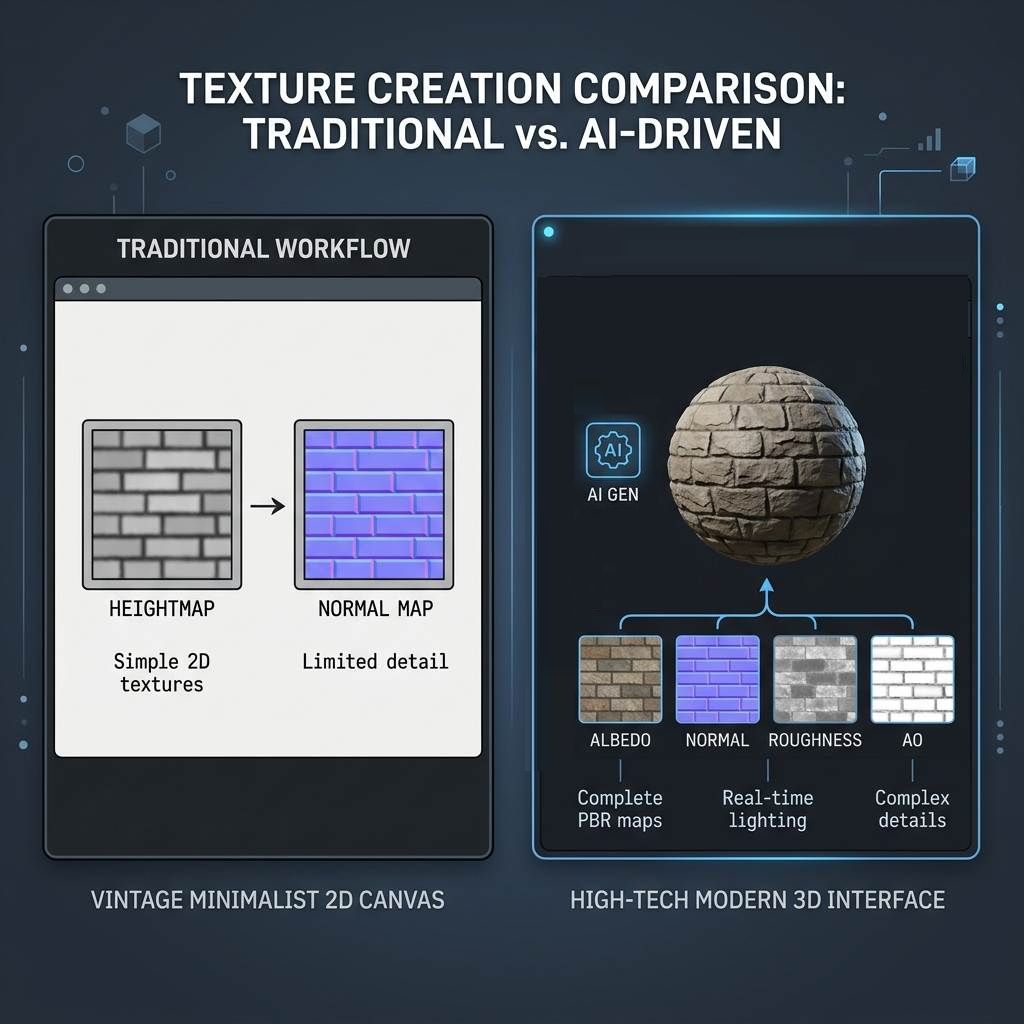 *Comparing traditional browser-based filter algorithms with modern AI-assisted PBR texture synthesis workflows.*
Understanding the Heritage of cpetry.github.io
Launched around 2014, cpetry.github.io/NormalMap-Online introduced a clean, zero-friction interface for converting 2D images into tangent space normal maps. It remains a reliable tool for specific lightweight tasks.
Core Strengths of NormalMap-Online
- 100% Client-Side Processing: All computations execute locally on the user’s GPU via WebGL shaders. No source images are uploaded to external servers, ensuring instant feedback and absolute data privacy.
- Lightweight and Fast: The interface loads within milliseconds without account registration, paywalls, or cloud processing queues.
- Dedicated Grayscale Filter Controls: Provides direct mathematical sliders for convolution matrices, including Sobel and Scharr gradient filters, level adjustments, blur/sharpness filters, and individual RGB channel inversion.
- Basic Map Generation: Outputs standard Normal maps, Displacement (Height) maps, Ambient Occlusion (AO) maps, and legacy Specular maps from a single source image.
Technical Limitations of 2D Gradient Filters
The primary architectural limitation of traditional tools stems from their mathematical foundation: they convert pixel luminance directly into height data.
When using a clean, pre-authored grayscale displacement map (where white strictly represents high elevation and black represents deep crevices), this approach produces mathematically sound normal vectors. However, when feeding standard real-world photographs into a Sobel filter, the algorithm misinterprets color brightness as physical depth:
- A dark blue stone in sunlight is calculated as a deep pit because of its low luminance.
- A white painted line on flat asphalt is calculated as a raised ridge because of its high luminance.
- Directional shadows cast by outdoor lighting become permanently baked into the normal angles, causing lighting bugs inside modern game engines.
Architectural Evolution: Traditional Algorithms vs AI PBR Pipelines
Modern 3D workflows require materials that separate surface reflectance (Albedo), micro-surface roughness (Roughness), conductivity (Metallic), and geometric surface perturbation (Normal and Height).
1. AI Text-to-Texture Generation (Prompt-to-PBR)
Traditional tools require artists to already possess a high-resolution photograph or a hand-painted displacement map before generation can begin.
Modern AI-driven systems allow artists to synthesize production-ready materials directly from natural language prompts (e.g., "rough mossy cobblestone, wet slate mortar joints, tileable 4K"). The neural network understands material physics and directly outputs synchronized PBR suites (Albedo, Normal, Roughness, Height, and AO) without requiring manual photo sourcing.
2. Photometric Delighting (Lighting and Shadow Removal)
When capturing texture photos with smartphones or DSLR cameras, ambient sunlight, studio flash reflections, and cast shadows are baked directly into the color data.
Applying a traditional normal filter to an un-delighted photo produces incorrect normal vectors along shadow boundaries. Modern AI PBR generators incorporate specialized Delight algorithms that analyze low-frequency illumination gradients and neutralize directional highlights. This returns a purely flat, physically accurate Albedo map suitable for dynamic lighting in Unreal Engine and Unity.
3. Infinite Seamless Tiling and Seam Synthesis
A flat photograph or texture cannot be tiled across large architectural surfaces without visible boundary seams.
While classic photo editors rely on manual Offset filters and Clone Stamp brushes, modern online generators incorporate automated Seamless Texture synthesis. The algorithm matches pixel boundaries, equalizes exposure across opposite edges, and inpaints transitional grain patterns to guarantee artifact-free tiling across infinite terrain meshes.
4. Background Removal and Alpha Extraction (Remove Black Background)
VFX artists, technical animators, and UI designers frequently encounter particle sprites, fire explosions, electric arcs, and scanned signatures saved on solid black backgrounds.
Modern texture platforms provide dedicated Alpha Extraction tools. Using inverse screen blending and color decontamination algorithms, the tool separates semi-transparent glows, embers, and linework from black backgrounds, outputting production-ready transparent PNG assets without dark fringing along alpha edges.
5. High-Fidelity 3D Real-Time PBR Viewport
While cpetry.github.io includes a functional WebGL preview with basic Phong/Blinn specular shading on default primitives (cube, sphere, cylinder, plane, teapot), modern pipelines demand real-time physically based shading:
- Environment Lighting (IBL / HDRI): Simulates real-world skybox reflections on metallic and glossy surfaces.
- Roughness / Metallic Microfacet Models: Evaluates GGX specular distribution to accurately represent polished chrome, brushed bronze, or matte plaster.
- Dynamic Tessellation and Displacement: Real-time height displacement preview with customizable subdivision levels.
- Interactive Light and Model Controls: Rotate directional light sources, toggle wireframes, and switch between diverse test meshes.
Technical Comparison Matrix
| Feature / Dimension (功能维度) | cpetry NormalMap-Online (传统开源工具) | NormalMap AI (现代PBR生成器) |
|---|---|---|
| Core Architecture (核心技术架构) | 2D Sobel / Scharr WebGL gradient filters | Deep neural networks and physics-aware texture models |
| Input Source (输入方式) | Local image files only (PNG, JPG, TGA) | Image upload OR Text-to-Texture prompt generation |
| PBR Material Standard (材质规范) | Legacy Specular / Glossiness pipeline | Modern Metallic / Roughness / AO / Normal workflow |
| Delighting Engine (去光照/阴影消除) | Not supported (shadows bake into normals) | Automated photometric delighting filter |
| Seamless Texture Synthesis (无缝平铺) | Not supported (requires external tiling) | AI edge-blending and patch inpainting (Tileable 4K) |
| Background Removal (去黑底/透明通道) | Not supported | Dedicated VFX alpha extraction and color decontaminate |
| Normal Map Format (法线坐标系) | OpenGL / DirectX channel toggle | OpenGL / DirectX export with Green channel inversion |
| 3D Preview Engine (3D实时预览) | Basic WebGL Phong shader on 5 primitives | Real-time PBR viewport with HDRI lighting and tessellation |
| Server Requirement (运行环境) | 100% Client-side browser execution | Hybrid: client-side processing and AI cloud synthesis |
Workflow Decision Guide: When to Use Each Tool
Selecting the optimal tool depends on your production assets, pipeline requirements, and target engine.
Choose cpetry.github.io When:
- You already have a hand-authored, perfectly clean grayscale displacement map.
- You need an immediate, offline-capable bump map during a game jam without waiting for server processing.
- You are working with legacy game engines (e.g., Unity legacy specular shader, older Source Engine mods).
- You require fine-grained manual control over discrete convolution filter matrix values.
Choose NormalMap AI When:
- You need to create brand-new materials from scratch using natural language prompts without searching stock photo libraries.
- Your source photographs have uneven lighting, shadows, or flash glare that must be neutralized via photometric delighting.
- You are authoring large architectural surfaces, terrain floors, or fabric patterns that must tile seamlessly without grid lines.
- You need to extract clean transparent alpha channels from VFX fire, sparks, or logos on dark backgrounds.
- You are building assets for modern PBR engines (Unreal Engine 5, Unity HDRP, Blender Cycles/Eevee, Godot 4).
Creating Production-Ready PBR Materials
Integrating automated texture generation into your 3D workflow shortens the gap between concept design and final engine implementation.
If you need to generate physically accurate normal maps, roughness maps, and ambient occlusion from text prompts or raw photos, start with our Free Online Normal Map and PBR Generator — Try Weathered Stone Wall. You can also generate infinitely tileable surface materials using our Seamless Texture Generator Online — Try Industrial Metal Panels.
Related reading: What is a Normal Map? · Best Normal Map Creator Online · Make Image Seamless Online · How to Preview PBR Materials Online