
Achieving believable window glass is one of the most deceptively difficult tasks in 3D architectural visualization and game environment production. If you assign a completely smooth transmission material with a pure flat normal map (RGB 128, 128, 255), your building facade turns into a sterile, razor-sharp computer graphics mirror that shatters viewer immersion. In the physical world, architectural glass is never optically flat; it exhibits cooling roller waves from the float glass manufacturing process, atmospheric condensation, rainwater trails, and frame bevels captured across a dedicated window normal map.
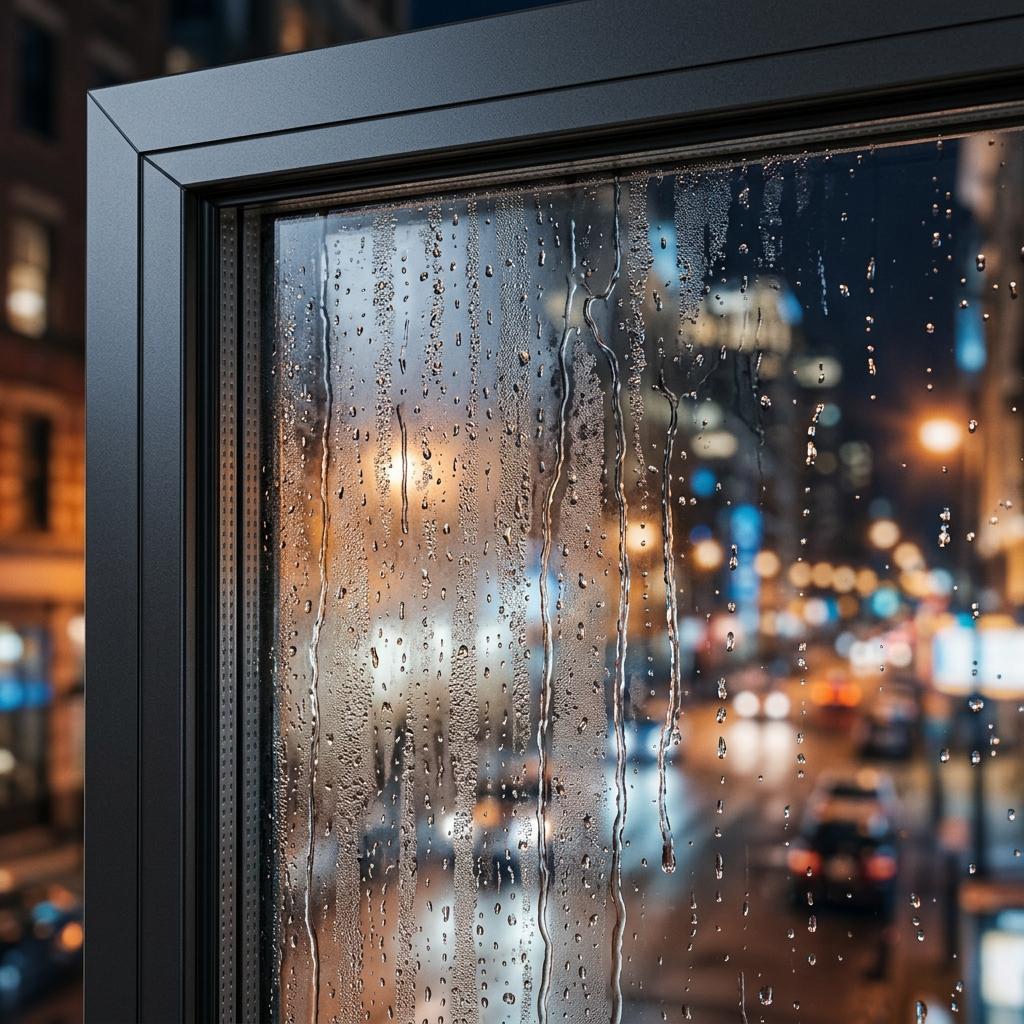
Subtle surface normal variations bend environment reflections and screen-space refractions, grounding modern architectural glass in physical realism.
When you configure normal maps for translucent materials, every vector deflection redirects both reflected specular light and transmitted background rays. Dialing in the correct vector intensity and multi-frequency layers separates realistic exterior facades from plastic architectural models. Below is the production workflow for authoring, calibrating, and shading window normal maps across architectural float panes, rainy glass, and industrial framed assemblies.
The Tri-Frequency Layering Architecture for Windows
Realistic architectural fenestration requires isolating three distinct visual frequency bands before feeding normal vectors into your dielectric PBR shader:
[Tri-Frequency Window Normal Blending Architecture]
(Macro Layer: Structural frame bevels, silicone caulking) ──┐
                                                            ├──> [RNM Blend A] ──┐
(Mid Layer: Float glass manufacturing roller distortion)   ──┘                   ├──> [RNM Blend B] ──> [Shader Normal]
                                                                                  │
(Micro Layer: Rain droplet beads, condensation, scratches) ───────────────────────┘- Macro Frequency (Mullions, Bevels, and Caulking): Window frames and sash profiles rely on baked normal maps to round off hard 90-degree polygon edges. Softening frame edges with a
2mmto4mmchamfer normal allows light to catch specular rim glints, eliminating the razor-sharp look of raw geometry. - Mid Frequency (Float Glass Roller Distortion): Large commercial glass lites undergo thermal tempering, introducing subtle undulating waves with periods between
20cmand60cm. This requires a low-contrast, low-frequency normal map with very slight amplitude (Strength: 0.03 - 0.08) to warp panoramic skybox reflections realistically. - Micro Frequency (Droplets, Condensation, and Smudges): Surface water beads, fine mist spray, and exterior dust films introduce high-frequency normal perturbations that scatter specular glints into organic highlights.
Why Flat Glass Normals Break Reflections
Float glass is produced by pouring molten glass onto a bath of molten tin. While exceptionally flat, cooling stresses create localized surface deviations of 10 to 30 microns. When an environment skyline reflects across a high-rise building, these microscopic deviations distort straight building horizons into gentle fluid curves. Without a subtle window normal map, parallel reflections render perfectly straight, instantly signaling artificial CGI rendering.
PBR Window Glass and Normal Calibration Table
The table below outlines calibrated physical parameters and normal vector recommendations for primary architectural and automotive window types:
| Window Application | Base Color (Albedo Hex) | Transmission / Opacity | Roughness Range | Normal Map Style | Normal Map Strength | Index of Refraction (IOR) |
|---|---|---|---|---|---|---|
| Modern Float Glass (Clean) | #FFFFFF (Clear tint) | 0.98 - 1.0 | 0.005 - 0.02 | Low-frequency Perlin ripple wave | 0.02 - 0.05 | 1.520 (Crown glass) |
| Rainy Exterior Pane | #E8EEF2 (Cold grey tint) | 0.92 - 0.96 | 0.02 - 0.08 | Directional vertical rivulets and droplet beads | 0.35 - 0.70 | 1.520 (Glass) / 1.333 (Water) |
| Steamy Shower / Sauna | #F0F4F8 (Diffusion white) | 0.70 - 0.85 | 0.25 - 0.45 | High-frequency Voronoi mist condensation | 0.40 - 0.65 | 1.515 |
| Vintage Rolled / Crown Glass | #DCE8DC (Slight green) | 0.90 - 0.95 | 0.04 - 0.10 | Pronounced hand-blown cylindrical waves | 0.15 - 0.30 | 1.525 |
| Industrial Wired Glass | #E5E2DC (Warm amber tint) | 0.80 - 0.90 | 0.08 - 0.18 | Diamond grid wire emboss with pitted skin | 0.50 - 0.85 | 1.530 |
Note: In all real-world dielectric glass shaders, keep Metallic = 0.0. Color tinting should occur inside the Volume Absorption or Transmission Color parameter rather than the Base Color to maintain realistic edge Fresnel reflection.
Step-by-Step: Setting Up a Dynamic Rainy Window Shader
Dynamic rain running down exterior architectural glazing brings life to cinematic scenes and game environments. Follow this step-by-step pipeline in Blender Cycles/Eevee or Unreal Engine 5:
- Straighten Pane UV Coordinates: Lay out the window glass UV island strictly upright so the vertical Y axis aligns with physical gravity. This guarantees running water rivulets flow downward without diagonal shearing.
- Combine Static Droplets with Flowing Streams:
- Sample a static condensation normal map (high-density micro beads).
- Sample a directional rain stream normal map animated with a continuous UV Panning node (
Time * -0.15on the V axis). - Use an alpha mask channel packed in the rain texture to isolate flowing streaks from unaffected dry zones.
- Blend Vectors with Reoriented Normal Mapping (RNM):
Avoid mathematical addition or linear interpolation (
Lerp) when combining condensation and rain streaks. Use theBlendAngleCorrectedNormalsmaterial function in Unreal Engine or vector cross-product math in Blender to preserve unit-length normals and prevent black rim artifacts. - Link Normal Channels to Roughness Variation:
Rain droplet peaks are smooth and highly reflective (
Roughness: 0.02), while dried mineral fringes around water tracks scatter light (Roughness: 0.15 - 0.30). Wire the inverted grayscale height derivative of your droplet normal map into the material Roughness socket. - Calibrate Refraction Distortion:
In Unreal Engine (Translucent Blend Mode with Surface Translucency Reflections), feed the final blended normal map into both the Normal input and Refraction input. Scale the refraction vector by an intensity factor between
0.01and0.03to prevent aggressive optical warping near polygon borders.
[Rain Window Refraction Logic]
Normal Map (XY Channels) ──> [Multiply by Refraction Depth (0.02)] ──> [Add to Scene Color UVs]
                                                                                │
                                                                                ▼
                                                                  [Sample Scene Color (Distorted)]
Creating Custom Window Normal Maps for Your Pipeline
Generating clean normal maps for architectural glazing, vintage leaded windows, and rainy vehicle windshields manually in 2D image editors often results in blurry gradients and harsh stair-stepping. Specialized AI-assisted and procedural tools generate mathematically normalized height fields that preserve subtle micro-facets under real-time lighting.
If you need to generate production-ready window normal maps, condensation profiles, and glass PBR textures, power up your 3D workflow with our Free Online Normal Map and PBR Generator — Try Architectural Window Glass. You can also generate seamless tileable water-streaked glass surfaces for large structural facades using our Seamless Texture Generator Online.
Window Shading Production Checklist
- Window pane UV islands aligned strictly with real-world vertical gravity.
- Low-frequency float glass waves kept subtle (
Strength: 0.02 - 0.05) to prevent funhouse mirror reflections. -
Metalliclocked strictly to0.0; glass is an absolute dielectric insulator. - Index of Refraction (IOR) calibrated to
1.52for standard float architectural glass. - Rain streams and static condensation blended using Reoriented Normal Mapping (RNM).
- Refraction offset clamped to eliminate screen-edge background sampling leaks.
Related reading: Transparent Textures Rendering Guide · How to Use Normal Maps in Unity and UE5 · Shattered Glass Normal Map Generator · Water Texture Seamless Guide