
Whether you are designing a post-apocalyptic cityscape, a tactical FPS multiplayer map, or a sci-fi cockpit, broken and fractured windows are essential environmental storytelling elements. However, actually modeling intricate 3D cracks and glass shards in your primary mesh will destroy your polygon budget and cause severe Z-fighting.
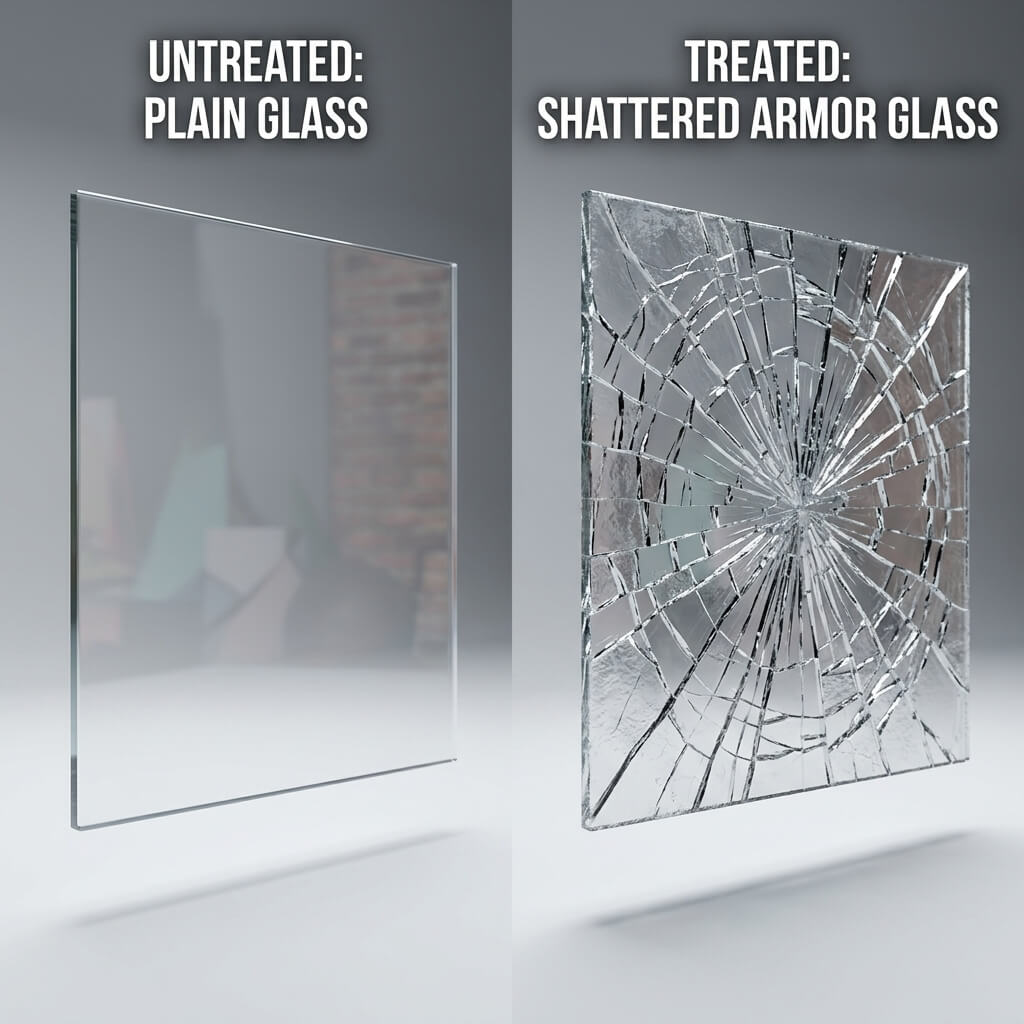
By driving surface refraction and specular highlights with a dedicated normal map, a flat 2-triangle window quad appears deeply fractured.
The industry-standard solution is to rely entirely on a shattered glass normal map paired with a customized roughness override. This creates the optical illusion of deep, sharp fractures, chipped impact craters, and overlapping glass layers on a perfectly flat 2-triangle quad.
Why Normal Maps Work So Well on Glass
Glass rendering in modern game engines (such as Unreal Engine 5, Unity HDRP, or Godot 4) relies heavily on screen-space refraction and Fresnel reflections.
When light hits a transparent surface, the angle of the surface normal dictates two things:
- Refraction Distortion: How sharply the background image is bent as light passes through the glass.
- Specular Glint: The sharp, bright highlight reflected from light sources.
Because a shattered glass normal map abruptly shifts the surface vectors along crack lines, the engine’s shader automatically bends the background light at sharp angles along those seams. To the player’s eye, the glass looks physically broken and multi-layered, even though the vertex count remains absolute zero.
Step-by-Step: Generating a Shattered Glass Normal Map Online
Instead of spending hours sculpting fractures in ZBrush or setting up complex Voronoi cell fracture simulations in Blender, you can generate production-ready glass normal maps from 2D fracture patterns in seconds using our browser tool.
Step 1: Prepare a Clean Fracture Mask
You need a high-contrast black-and-white image representing the crack pattern. You can either draw thin white lines on a black background in Photoshop/Procreate, or generate a procedural cell pattern using AI prompts like "high contrast black and white shattered glass lines, clean vector graphic".
Step 2: Upload to the Online Normal Map Creator
Open our Free Normal Map Creator — Try Shattered Glass and drop your black-and-white fracture image into the upload box.
Step 3: Adjust Strength and Edge Bevel
Glass cracks require sharp, abrupt surface changes rather than smooth, pillow-like gradients:
- Set Strength to High (3.0 - 5.0): This ensures the light refraction bends sharply along the fracture lines.
- Set Blur / Bevel to Minimum (0.1 - 0.5px): Real glass breaks with razor-sharp edges. Keep the filter sharpness as crisp as possible so the cracks don’t look like melting plastic.
- Invert Green Channel (if necessary): If you are exporting to Unreal Engine (DirectX), ensure the Y-channel matches your target pipeline so the impact craters indent inward rather than popping outward.
Step 4: Export Supporting PBR Maps
For realistic glass, a normal map alone isn’t enough. Use the export suite to download:
- Normal Map: Drives the edge refraction and specular glints.
- Roughness Map: Invert your crack mask so the clean glass stays glossy (Roughness ~
0.05), while the pulverized impact dust along the crack lines appears rough and matte (Roughness ~0.6). - Ambient Occlusion (AO): Darkens the deep micro-crevices where overlapping glass shards meet.
Shader Setup Tips for Game Engines
Once you import your shattered glass maps into Unreal or Unity, apply these quick material overrides for maximum realism:
[Unreal Engine 5 Glass Shader Setup]
Blend Mode: Translucent
Lighting Mode: Surface TranslucencyVolume
Base Color: Tinted Dark Grey / Green (e.g., RGB 0.1, 0.15, 0.12)
Metallic: 0.0
Specular: 0.9 (Boosts surface glint)
Roughness: Plug in your generated Roughness Map
Normal: Plug in your Shattered Glass Normal Map
Refraction: Wire a Fresnel node mixed with your Normal Map (Index of Refraction ~ 1.52)
By keeping your geometry lightweight and letting clean normal mapping handle the optical complexity, you can scale broken windows across entire city blocks while maintaining rock-solid 60+ FPS performance. Start synthesizing your impact fractures today: Generate Shattered Glass Normal & PBR Maps Now or create tileable surface backgrounds with our Seamless Texture Generator.
Related reading: Normal Map Fundamentals · Roughness Map Guide · AO Map — Contact Shadows Explained · Best Normal Map Creator Online