
Building realistic 3D surfaces in modern engines like Unreal Engine 5, Unity, and Blender requires accurate micro-surface lighting responses. A flat diffuse texture without normal information looks paper-thin under dynamic spotlights. While dedicated 3D texturing software suites require expensive licenses and heavy local GPU hardware, using a browser-based normal map maker online empowers game developers, indie modders, and architectural visualizers to synthesize tangent-space normal maps, roughness channels, and ambient occlusion passes in seconds without installing software.
However, not all online normal map creators are engineered equally. Early browser tools relied on simplistic pixel derivative math that frequently produces noisy, inverted, or muddy results. Modern AI-accelerated normal makers inspect surface curvature and micro-geometry to deliver production-grade normal fidelity. Below is our guide to evaluating online normal map makers and mastering browser-based PBR material creation.
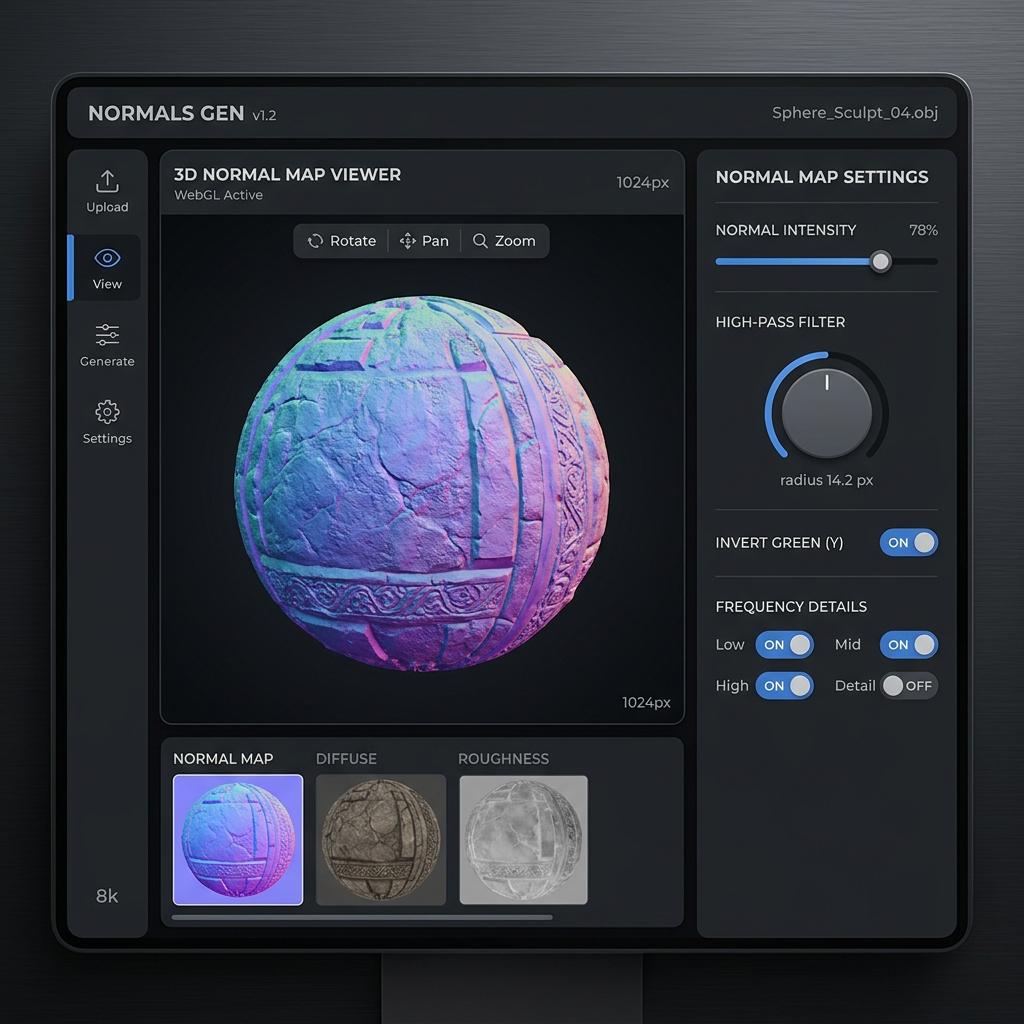
Online normal map maker interface featuring real-time WebGL 3D preview, frequency filters, and tangent space controls.
What Makes an Exceptional Online Normal Map Maker?
When choosing an online tool for your game production pipeline, prioritize these core technical capabilities:
- Hardware-Accelerated WebGL 3D Preview: An online generator must include an interactive real-time 3D viewport (supporting spheres, cubes, cylinders, and custom OBJ meshes) with movable light sources to verify specular highlights before downloading.
- Dual Coordinate Space Support (OpenGL and DirectX): A single-click toggle to invert the Green (+Y / -Y) channel is essential to prevent inverted shading in Unreal Engine or Blender.
- Multi-Scale Frequency Decomposition: High-end tools split image details into low, medium, and high-frequency layers, allowing you to enhance fine grain without bloating macro surface contours.
- PBR Map Bundle Synchronization: Generating a normal map in isolation is only half the battle. A complete tool simultaneously computes calibrated Roughness, Height, and Ambient Occlusion maps that share identical pixel alignment.
Technical Comparison: Online Normal Map Makers in 2026
| Tool / Platform | Processing Engine | Real-Time 3D Lighting Preview | Export Formats | PBR Channels Included | Cost |
|---|---|---|---|---|---|
| NormalMap.ai (Our Tool) | Neural depth estimation + WebGL shaders | Dynamic PBR light stage (Sphere/Cube/Mesh) | PNG (16-bit), JPG, WebP | Normal, Roughness, Height, AO, Metal | Free / Instant |
| SmartNormal (Legacy Web) | Basic Sobel convolution filter | Static 2D preview only | PNG (8-bit) | Normal only | Free |
| Cpetry NormalMap-Online | Client-side Canvas 2D math | Basic rotating WebGL cube | PNG (8-bit) | Normal, Displacement, AO | Free |
| Adobe Substance 3D Sampler | Desktop neural AI + procedural nodes | Full raytraced preview | Full 16/32-bit PBR formats | All channels + SBSAR | $19.99/mo subscription |
Step-by-Step: Creating Tangent-Space Normals Online
Follow this quick four-step process to generate game-ready normals in your web browser:
1. Upload Your Base Texture or Photo
Drop any PNG, JPG, or WebP image into the upload dropzone. For best results, use an evenly lit photograph or a diffuse albedo texture where cast shadows have already been neutralized.
2. Configure Normal Intensity and Level
- Strength / Intensity: Controls the steepness of surface slopes. A value between
1.5and2.5suits stone and brick, while subtle fabrics require0.8to1.2. - Level / Blur: Smooths out high-frequency camera sensor noise to prevent the normal map from sparkling excessively under sharp point lights.
3. Verify Specular Lighting in the 3D Viewport
Drag your mouse across the interactive 3D sphere viewport to orbit the directional sunlight. Check the grazing angles: highlights should sit cleanly on raised edges while cavities remain in shadow.
4. Export Your Synchronized Map Package
Click export to download your 2K or 4K PNG file. If importing into Unreal Engine 5, ensure your compression setting is configured to Normalmap (BC5) to prevent compression block artifacts.
Generate Normal Maps and Custom Materials Online
Save time and streamline your asset texturing pipeline without leaving your web browser.
If you need to generate production-ready normal maps and PBR textures for this workflow, start with our Free Online Normal Map Generator — Try Scratched Steel Plating.
You can also generate tileable surface textures for modular environment meshes using our Seamless Texture Generator — Try Industrial Steel Floor.
Common Normal Map Artifacts and How to Fix Them
[Normal Map Diagnostic Troubleshooting]
Problem: Normals appear inverted in Unreal Engine ──> Fix: Invert Green Channel (-Y DirectX)
Problem: Sparkling white noise under sharp lights  ──> Fix: Increase Level / Low-pass filter radius
Problem: Dark text creates deep geometric holes   ──> Fix: Use Neural AI depth mode instead of grayscale
Problem: Texture looks washed out or hyper-glossy  ──> Fix: Set texture node to Non-Color (Linear)
Related Guides and Reading
- Generate Normal Map from Image Online: Complete PBR Guide — Converting raw camera photos into calibrated 3D textures.
- Normal Map Values and RGB Range Explained — Mathematics behind 8-bit vector encoding.
- How to Use Normal Maps in Unity and Unreal Engine 5 — Shader graph setup and compression presets.
- Batch Process PBR Textures and Normal Maps Online — High-speed asset processing for game studios.