
In physically based rendering (PBR) pipelines, height maps and normal maps serve complementary roles in conveying surface relief. A height map (or displacement map) stores scalar elevation data as 8-bit or 16-bit single-channel grayscale values, where pure black ($0.0$) represents maximum depression and pure white ($1.0$) represents peak extrusion. Conversely, a tangent-space normal map encodes three-dimensional directional surface vectors directly into RGB color channels, allowing modern game engines to calculate micro-facet lighting without deforming the underlying polygon geometry.
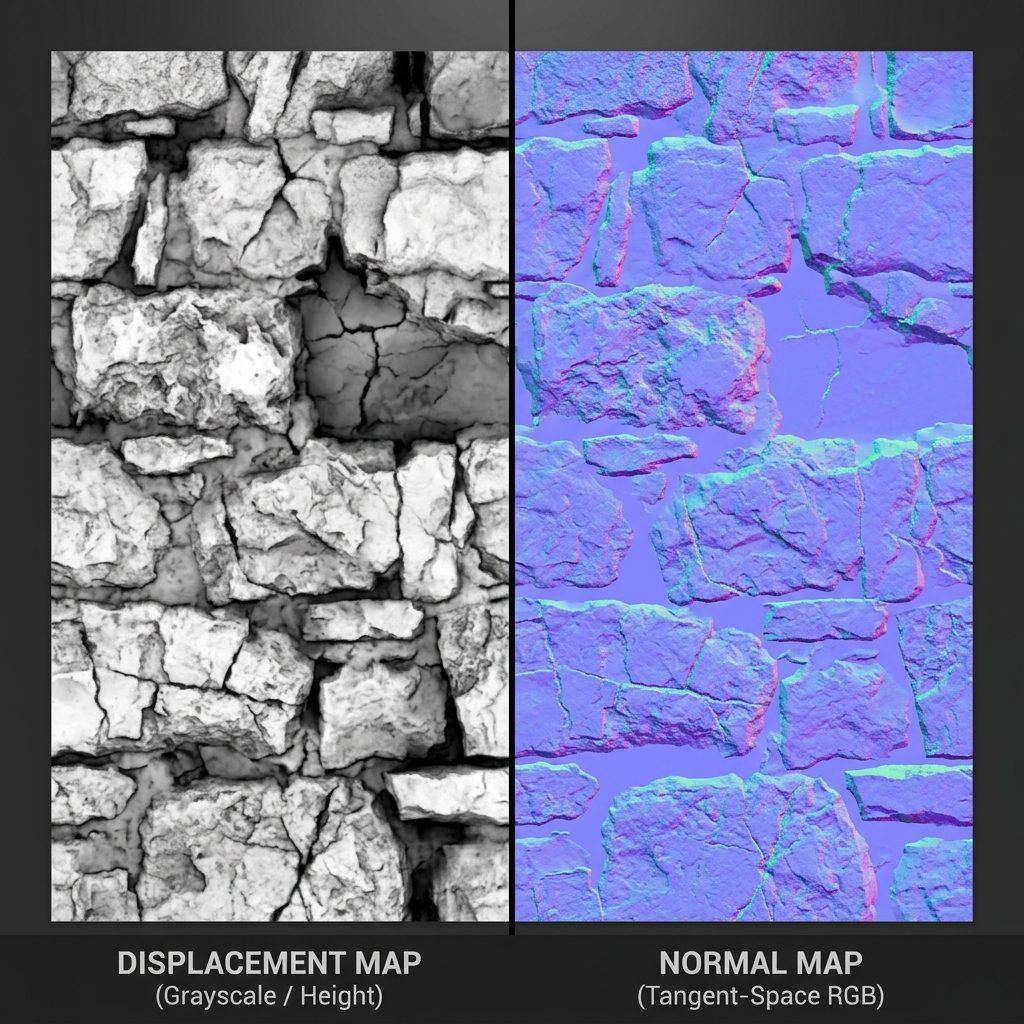
Converting a grayscale height map into a tangent-space normal map requires computing the spatial derivative along the surface’s horizontal ($X$) and vertical ($Y$) axes. Rather than manually writing custom pixel shaders or relying on slow desktop offline bakers, you can generate high-precision tangent-space normals with precise coordinate swizzling directly inside your browser.
Mathematical Foundations: How Height Derives Tangent Normals
The mathematical transformation of scalar grayscale height into vector normal coordinates relies on discrete gradient operators such as Sobel or Scharr convolution kernels:
[Grayscale Height Grid Z(u,v)]
       │
       ▼
[Discrete Convolution Filters]
dx = (Z(u+1, v) - Z(u-1, v)) * FilterStrength
dy = (Z(u, v+1) - Z(u, v-1)) * FilterStrength
       │
       ▼
[Surface Normal Vector N]
N = normalize(-dx, -dy, 1.0)
       │
       ▼
[Color Space Remapping: [-1.0, 1.0] ──> [0, 255]]
R = (N.x * 0.5 + 0.5) * 255 (Horizontal Red)
G = (N.y * 0.5 + 0.5) * 255 (Vertical Green)
B = (N.z * 0.5 + 0.5) * 255 (Perpendicular Blue ~128-255)
Because tangent-space normals predominantly point straight outward from the polygon surface ($Z \approx 1.0$), the resulting image exhibits the signature periwinkle blue hue (RGB: 128, 128, 255). When converting height maps, tuning the convolution filter strength dictates the perceived depth steepness of the bevel.
Try generating this material directly with our AI Seamless Texture Generator.
Technical Comparison: Height vs Normal vs Displacement Maps
Understanding the operational trade-offs between surface relief maps prevents performance bottlenecks in real-time engines:
| Technical Attribute | Grayscale Height Map | Tangent Normal Map | Tessellated Displacement Map |
|---|---|---|---|
| Data Channels | Single-channel grayscale (R or L) | 3-channel vector RGB (XYZ) | Single-channel 16-bit float |
| GPU Memory Footprint | Small (BC4 compression, ~8 bits/pixel) | Moderate (BC5 compression, 2 channels) | High (requires runtime vertex subdivision) |
| Silhouette Deformation | No (flat silhouette edge) | No (fakes lighting angles only) | Yes (physically displaces geometry vertices) |
| Rendering Cost | Negligible | Extremely fast per-pixel lighting | Heavy GPU vertex tessellation budget |
| Target Engine Use | Parallax Occlusion Mapping (POM) | Standard PBR surface lighting (Unity/UE5) | Cinematic close-ups & Nanite virtual geometry |
Step-by-Step Tutorial: Converting Height Maps to Normal Maps Online
Follow this workflow to transform 8-bit or 16-bit grayscale height files into production-ready normal textures:
- Verify Grayscale Contrast Boundaries: Ensure your input height map spans the full dynamic range ($0$ to $255$). If height values are compressed into a narrow mid-grey band, contrast will appear faint.
- Import into the Generator: Drag your height map into the NormalMap.ai Online Converter. The WebGL viewport instantly renders the converted normal vectors on a 3D preview mesh.
- Configure High-Pass and Low-Pass Filters: Adjust the filter radius slider. Low-pass filters smooth out high-frequency noise from paper or film grain, while high-pass filters emphasize micro-cracks and tactile crevices.
- Select Tangent Green Channel Swizzle (OpenGL vs DirectX):
- For Unreal Engine, 3ds Max, and DirectX, toggle Invert Green (Y-).
- For Unity, Blender, Godot, and WebGL (Three.js), maintain the default OpenGL (Y+) coordinate orientation.
- Adjust Normal Intensity Multiplier: Set the intensity scalar between
1.0and3.5. Avoid excessive over-intensification that pushes vectors beyond $90^\circ$, which causes specular black rim artifacts in game engines. - Export Production Formats: Download as PNG or uncompressed TGA ready for immediate import into your game engine or 3D DCC package.
4 Common Troubleshooting Scenarios in Height Conversion
Avoid these frequent procedural errors when deriving tangent vectors:
1. Inverted Inset Shadows (DirectX vs OpenGL Mismatch)
If brick mortar grooves appear lit from beneath while sunlight comes from above, your Green channel orientation is flipped. Toggle the Green channel invert switch to match your engine’s tangent orientation. Learn more in our normal map range and intensity guide.
2. Stepping Banding Artifacts on 8-Bit Grayscale Inputs
8-bit grayscale images possess only 256 discrete tonal steps. When converted with high intensity multipliers, subtle gradients produce harsh stair-step banding rings. Apply a slight 1-pixel Gaussian pre-blur or use 16-bit height inputs to eliminate stepping.
3. Noise Amplification in Smooth Regions
Noisy photographic height maps create harsh glitter sparkles across flat planes. Separate macro-surface structure from high-frequency roughness, delegating micro-scratches to your PBR roughness channel instead.
4. Over-Beveling Across Hard Mechanical Edges
On industrial hard-surface models, height map conversions can round off crisp $90^\circ$ bevels into doughy slopes. Constrain filter radius to low pixel values (2px to 4px) for manufactured machinery.
Ready to Generate PBR Normal Maps?
Skip manual baking and transform your 2D images into tangent-space PBR textures in seconds:
- Launch with Preset Prompt: Generate Seamless Material Now
Related reading:
Frequently Asked Questions
What is the primary difference between a height map and a normal map?
A height map stores single-channel vertical elevation distances ($Z$ height) as grayscale values. A normal map stores three-dimensional directional perpendicular vectors ($X, Y, Z$) encoded into RGB color channels, allowing dynamic light sources to calculate realistic surface reflections from any angle.
Should I use DirectX or OpenGL normal maps for Unity?
Unity uses the OpenGL standard, meaning the Green channel points Up ($Y+$). Unreal Engine uses DirectX, meaning the Green channel points Down ($Y-$). If your normals appear inverted in Unity, invert the Green channel.
Can I convert height maps created in Substance Designer or ZBrush?
Yes. 8-bit PNG, 16-bit PNG, or TIFF height maps exported from Substance Designer, ZBrush, or Photoshop can be dragged directly into our converter for instant WebGL normal calculation.
Does converting height to normal maps create real 3D geometry?
No. Normal maps are an optical illusion calculated in real-time pixel shaders. They alter how light bounces across polygon surfaces, creating the appearance of depth without increasing vertex counts. For true geometric deformation, pair with vertex displacement.
Why do my converted normal maps show strange ring banding?
Ring banding occurs when 8-bit height maps with low bit-depth are subjected to aggressive contrast stretching. Enabling subtle high-pass filtering or supplying 16-bit source files smooths out stepping artifacts.