
When detailing luxury architectural visualizations, the choice of metal accents can make or break the realism of the scene. While bright brass or chrome can look cheap and dated, a high-quality dark bronze texture seamless material instantly elevates the sophistication of any room. Dark bronze is the go-to finish for high-end window mullions, elevator doors, bespoke door hardware, and modern lighting fixtures.
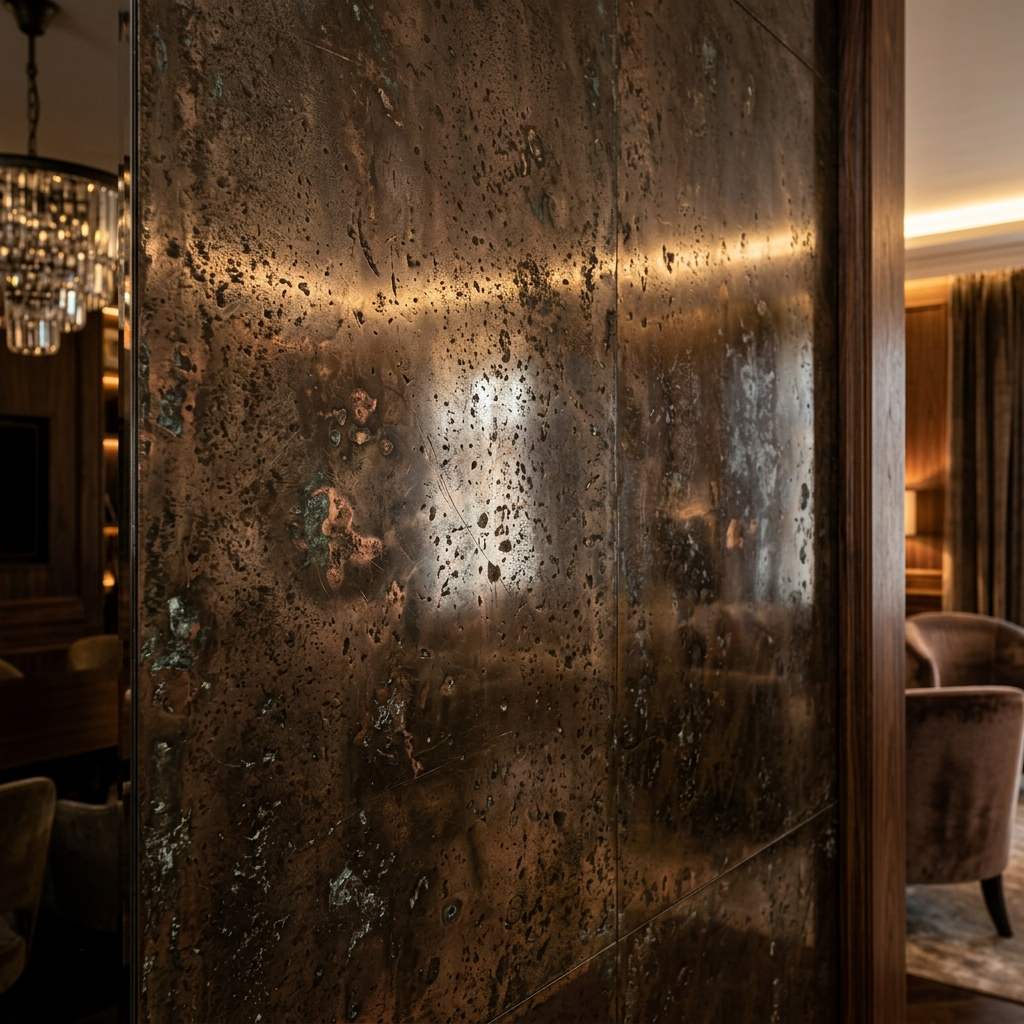 *A photorealistic dark bronze material relies on extremely subtle roughness variations to catch the light beautifully.*
Why Seamless Dark Bronze is Essential
Unlike flat paint, dark bronze is a complex, reactive material. Depending on how the light hits it, it can look almost pitch black or glow with a warm, coppery undertone.
In a 3D environment, you cannot simply set a material to “dark brown” and turn up the metallic slider. To achieve true photorealism, you need a seamless (tileable) PBR texture set. A seamless texture ensures that when you apply this material to a massive 20-foot architectural column, you won’t see a repeating grid of scratches or brush marks.
A high-quality dark bronze texture set will always include a dedicated Roughness map and an Anisotropic map to dictate exactly how the highlights stretch across the brushed metal surface.
Top Styles of Dark Bronze Seamless Textures
When building your PBR material library, you should source these three primary variations of dark bronze:
1. The Brushed Oil-Rubbed Bronze
This is the most common architectural finish. It features very fine, parallel brush strokes. The metal appears almost black head-on but reveals warm bronze highlights at grazing angles.
- Best Use Case: Window frames, door handles, and plumbing fixtures.
2. The Oxidized Antique Bronze
A highly distressed, weathered finish. This texture features patches of dark green or turquoise patina mixed with deep brown metal. The roughness map must be highly detailed to separate the matte patina from the shiny metal.
- Best Use Case: Exterior architectural statues, vintage lamps, and rustic interior details.
3. The Pitted Cast Bronze
Instead of brush marks, this texture mimics liquid bronze poured into a sand mold. It features a bumpy, porous surface driven entirely by a high-resolution Normal map.
- Best Use Case: Heavy industrial hardware and decorative sculptural elements.
PBR Setup for Dark Bronze
To correctly render a dark bronze seamless texture in Blender, V-Ray, or Unreal Engine, configure your shader with these settings:
| Parameter (参数) | Value (建议值) | Technical Rationale (物理渲染原理) |
|---|---|---|
| Base Color / Albedo | Hex #2A1F1A | Defines the very dark, nearly black brown core color. |
| Metallic | 1.0 | Bronze is a pure metal. Never lower this value for architectural metals. |
| Roughness | 0.15 - 0.35 | Controls the blurriness of the reflection. Plug your brushed smudge map here. |
| Anisotropy | 0.5 - 0.8 | Essential for brushed bronze; stretches the reflection highlight along the brush direction. |
Generating Custom Bronze Textures
Finding the exact brushing pattern or patina level for a bespoke architectural detail is often impossible in stock libraries.
If you need to rapidly generate a custom, non-repeating metal finish, power up your pipeline with our Free Online Normal Map and PBR Generator — Try Scratched Metal. You can also generate perfectly tileable, brushed metal panels using our Seamless Texture Generator Online.
Related reading: Top 10 Brown Mirror Seamless Textures · How to Add Rough Texture in Blender · What is a Normal Map?