
When building expansive open-world landscapes in Unity, Unreal Engine 5, or Godot, your terrain shader lives or dies by the quality of your primary grass texture seamless pattern.
Because grass covers massive swathes of digital acreage, tiling a standard photograph across a 4km x 4km heightmap immediately reveals ugly, repeating checkerboard grids and visible lighting seams.
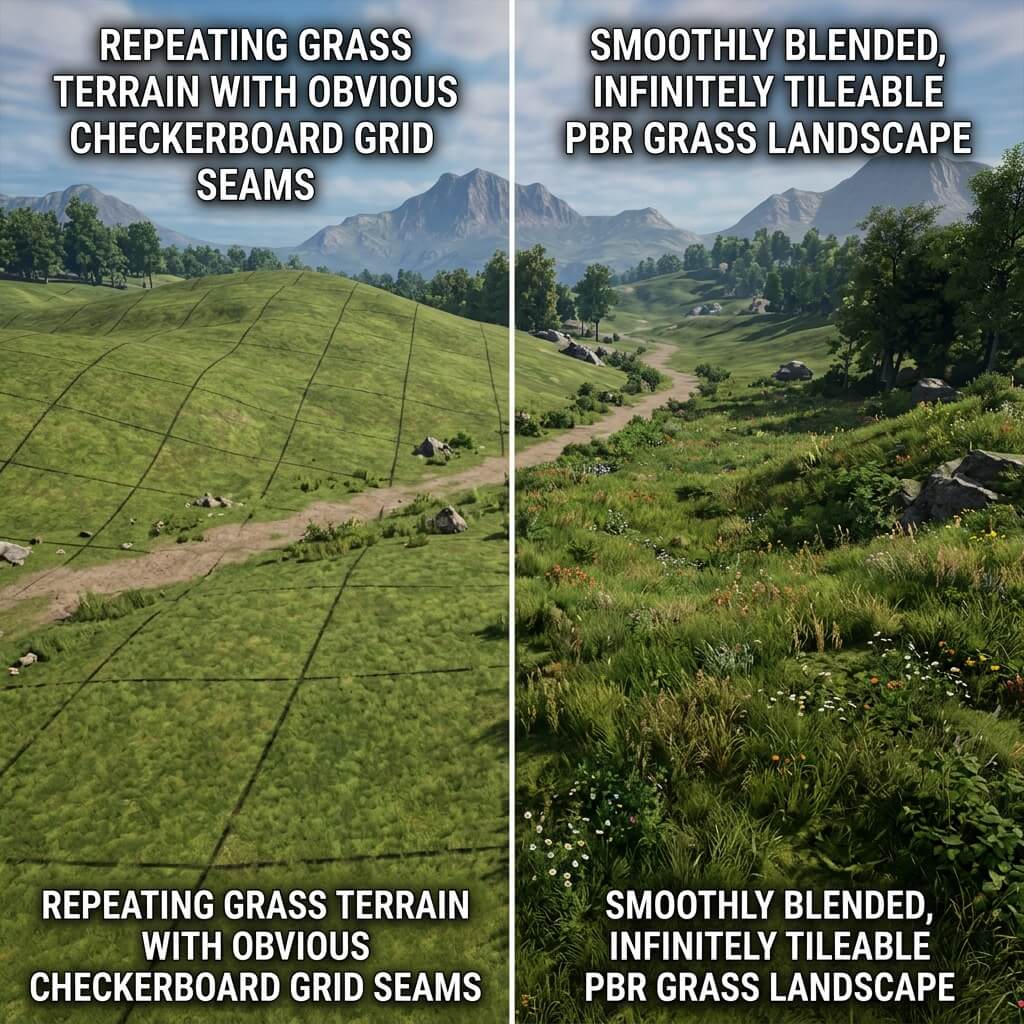
A proper seamless grass texture eliminates repeating dark blotches and directional sunlight gradients across wide terrain expanses.
To achieve natural, organic lawns and wild meadows without relying on heavy procedural shader noise or millions of instanced foliage meshes, you must process your base material to be completely isotropic (directionless) and photometric-delighted.
Why Grass Photographs Fail When Tiled
If you take a drone photo or camera snapshot of a grassy field and try to tile it directly onto a 3D terrain mesh, you will encounter two fatal optical flaws:
1. Directional Sun Shadows and Hotspots
In any real-world outdoor photograph, the sun illuminates one side of the grass blades while casting micro-shadows on the opposite side. When tiled across a digital floor, these baked-in shadows create an obvious, repeating dark pattern that ruins immersion.
2. High-Frequency Organic Clustering
Natural grass grows in irregular patches—some clumps are thicker, greener, or contain yellowish dried soil patches. When scaled down and repeated 500 times across a landscape, the human eye instantly locks onto these unique yellow or dark patches, creating a distracting grid effect known as “pattern fatigue.”
Step-by-Step: Generating Perfect Seamless Grass Online
You can eliminate both lighting gradients and boundary seams in seconds using our automated web-based tools—no manual Photoshop clone-stamping required.
Step 1: Upload or AI Generate Your Base Meadow
Open our Seamless Grass Texture Generator — Try Lush Lawn. Upload your own photo or switch to AI mode to describe the exact grass species.
Step 2: Apply the Delight Filter
Before synthesizing boundaries, toggle on the Delight filter. This algorithm scans the image for luminance gradients caused by outdoor sunlight and flattens the exposure across the entire canvas. The result is a purely neutral albedo color map where the left and right edges share the exact same brightness.
Step 3: Execute Organic Edge Synthesis
Click the Make Seamless button. Because grass consists of millions of overlapping vertical blades, simple linear edge-blending creates blurry, smeared seams. Our generator uses an organic texture synthesis algorithm that analyzes blade structure and interweaves individual grass strands across the tile boundary.
Step 4: Extract Terrain Normal and Roughness Maps
Flat grass looks like green carpet in 3D engines. Click Send to Normal Map to open the integrated map creator:
- Normal Map: Generate a crisp, high-frequency normal map (
Strength ~ 2.5) to make individual blades pop and catch low-angle sunset lighting. - Roughness Map: Set average roughness between
0.55 and 0.70. Fresh green blades have subtle waxy reflections, whereas dry thatch and underlying dirt should remain rough and matte (0.85).
Engine Optimization: Breaking up Terrain Tiling
Even with a flawless seamless grass texture, repeating any single 2K image across an entire mountain range will eventually look repetitive at high altitudes. Use these three industry techniques in your shader to break up macro-tiling:
1. Distance-Based Mipmap Blending
Blend between a detailed, high-frequency grass texture close to the camera and a softer, color-averaged terrain map in the far distance using the camera distance node.
2. Macro Color Variation Overlays
Multiply a large scale, low-frequency cloud noise or Perlin color map across the terrain coordinate space. This subtly tints random patches of your green lawn into slightly warmer olive or cooler emerald shades, completely hiding tile boundaries.
3. Detail Normal Overlay
Combine your primary grass normal map with a secondary, highly tiled micro-normal map to preserve crisp blade sharpness even when the player’s camera is inches from the ground.
Anti-Tiling Technique Reference Table
| Technique | When to Apply | Shader Cost | Visual Impact |
|---|---|---|---|
| Distance-Based Mipmap Blending | Terrain > 50m from camera | Low | High — kills far-tile grid |
| Macro Color Variation Overlay | All distances | Very Low | High — breaks repeating patches |
| Detail Normal Overlay | Close-up view (< 5m) | Medium | Very High — restores blade sharpness |
| Stochastic Sampling Shader | Large open-world terrains | Medium | Extreme — fully eliminates tiling |
Ready to upgrade your outdoor environment assets? Synthesize infinite tileable terrain and extract PBR maps using our Seamless Grass and Terrain Texture Generator and Normal Map Generator — Try Soil Ground.
Related reading: Create Seamless Textures Online · What is a Normal Map? · Roughness Map Guide · Make Any Image Seamless